


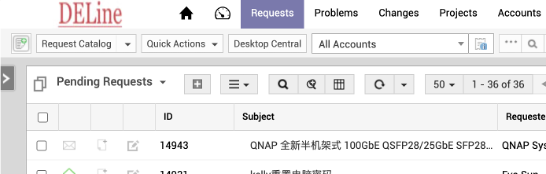
IT Ticket System
The ticket system helps to track user requests and upgrade events based on SLAs to ensure that there is someone resolving the issue.
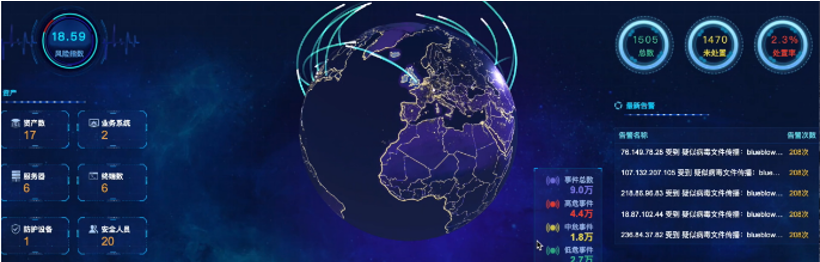
Cyber Security SIEM
SIEM system helps clients with a high sensitivity to network security to detect hidden dangers in the network in real-time.
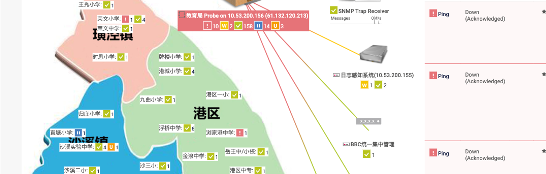
IT Network Monitor System
PRTG monitoring helps to detect alarms and performance issues in real-time in a network, identifying network and system bottlenecks to aid in troubleshooting analysis.
Customer results
Selected DELine projects in this area. Client names are withheld; figures come from our project and ticket records.
IT helpdesk SLA
One IT team for a plant and an office: 170 tickets closed in a year
170
tickets closed in 12 months
Client: A US-owned composites manufacturer with a plant in Jiangsu and an office in Shanghai. Name withheld.
Need: The company needed bilingual IT support with guaranteed response times for both sites, covering PCs, the network and its servers in Azure.
What we did: A remote SLA with a 5×8×4 helpdesk, 7×24 PRTG monitoring, a 4-hour response time and urgent on-site visits on working days at no extra charge, together with Azure hosting, Microsoft 365 and Sangfor EDR on the same contract.
Result: 170 tickets in the October 2025 – September 2026 contract year, all closed, with requests in every month. The SLA started in October 2024 and has been renewed each year.
IT outsourcing
Japanese-owned manufacturer: 199 tickets over two years, all closed
199
tickets closed in 24 months
Client: A Japanese-owned materials manufacturer near Suzhou with about 120 managed devices. Name withheld.
Need: The company needed day-to-day IT support and a regular on-site presence.
What we did: A 24-month IT SLA with a remote helpdesk and two scheduled on-site days every month.
Result: 199 tickets between April 2023 and March 2025, all closed, with requests in every month. Renewed for 2025 and 2026.
On-site engineer
A full-time on-site engineer, backed by a remote helpdesk
5×8
on-site engineer, plus 7×24 monitoring
Client: A plastics manufacturer near Suzhou with about 110 managed devices. Name withheld.
Need: The plant wanted an IT engineer on site every working day.
What we did: A DELine engineer on site Monday to Friday, backed by a 5×8×4 remote helpdesk and 7×24 PRTG monitoring.
Result: 59 tickets in the December 2024 – November 2025 contract year, all closed. The service has run since March 2023 and renews automatically.
How we take over your IT
Onboarding takes one to two weeks.
1
Set-up
Devices, accounts and network access for our engineers.
2
Monitoring
We add your servers and network devices to PRTG.
3
Records
We register the contract and every managed device, so each ticket is linked to the right asset.
4
Go-live notice
You receive a written notice that the service has started.
5
Handover
The engineer responsible for your company takes over day-to-day support.
In the first month we usually handle mailbox and account set-up, software installation, printers, folder permissions and VPN or remote access.
What we check every month
Remote check
Server CPU, memory and disk space; Windows updates; event logs; antivirus or EDR online and up to date; unusual accounts, logins and alerts; the latest backup; a spot check of two workstations.
SLA contracts also cover
Every backup job (Veeam, tape, NAS, Microsoft 365) and the space left for it; antivirus, EDR and backup licences not over-used or about to expire; remote access to every managed device.
On-site maintenance day
For contracts with on-site days: 26 checks, from server-room temperature and power, firewall, switch and Wi-Fi configuration backups and firmware, UPS load and battery runtime, to a file-restore test, NAS disks and RAID, and CCTV recording.
After each on-site maintenance day you receive a check-list report: every device is listed with its model, each check with its result, open issues at the end, and screenshots of the firewall, switches, Wi-Fi, UPS and every server's restore test, updates and disk space. Your contact and our engineer both sign it.
Every finding is opened as a follow-up ticket. Contracts can also include a yearly review with security consulting.
What the price depends on
The number of users and devices we support
The servers, virtual machines, firewalls, switches and routers we manage
The number of monitoring sensors
The number of sites
On-site days: most often one a month, also twice a month or weekly
Service hours: 5×8 or 7×24
Response time: typically 4 hours
Work outside the contract: hourly rate, travel by distance, weekend and holiday surcharge
Contract terms are agreed with each customer. New customers get a free initial assessment. Prices for work without an SLA are on our price page.
We already have an IT team. Can you work with them?
Yes. Your own IT team can keep handling day-to-day requests while we provide second-level support and security consulting under a yearly service package. For managed EDR, we run the platform (whitelists, asset management). When a threat cannot be removed automatically, we give your team second-level technical support, and they carry out the work on the device.
IT Helpdesk – frequently asked questions
What IT support does DELine provide to foreign companies in China?
DELine provides outsourced IT: first-level helpdesk for users, second-level support for core infrastructure, on-site service, and 7×24 monitoring of networks, servers and IoT devices with PRTG. Support is agreed in an SLA or billed per ticket.
What is the difference between SLA and non-SLA support?
SLA customers sign a contract that guarantees response and availability times. Non-SLA customers are billed per ticket and signed work report at published rates, for example ¥250 per hour for PC and printer work and ¥400 per hour for network and server work, excluding 6% VAT (rates version 1 Sep 2024). See the price page.
Which languages does the DELine helpdesk support?
Chinese and English; some DELine engineers also support German.
Where can DELine provide on-site IT support?
DELine has offices in Taicang (Suzhou), Changzhou and Shanghai and provides on-site support in and around these cities. Under the non-SLA price list, travel is charged at ¥5 per km for the round trip.
How does DELine monitor our IT systems?
DELine uses the PRTG platform to monitor devices over SNMP, WMI and other sensors 7×24. Alerts go to the DELine NOC so issues can be handled before users report them.
Related guides
Practical articles from DELine on this topic.
Managed network
Why Professional Network Outsourcing Matters: Deployment Is Only the Beginning
Why a company network needs ongoing management after the project has been delivered.
Endpoints
Why Is Chrome Taking Up Several GB? What Enterprises Should Check Before Disabling Local AI
What is behind the disk space Chrome can use for on-device AI, and what to check before turning it off.
Remote access
How to Choose an SSL VPN Alternative: An Enterprise Remote Access Migration Guide
How to evaluate alternatives to SSL VPN and plan an enterprise remote access migration.