How to Choose an SSL VPN Alternative: An Enterprise Remote Access Migration Guide
Remote work is routine, yet many organizations still let employees connect from the internet to internal networks through SSL VPN. The model did not suddenly become unsafe overnight. What has changed is the environment: more applications run in the cloud, users and devices are more distributed, and a remote-access gateway that remains internet-reachable while connecting to internal resources must be carefully patched, configured, and restricted.
FortiGate’s change brought this issue into sharper focus. Starting with FortiOS 7.6.3, SSL VPN tunnel mode is replaced by IPsec VPN. Existing settings are not automatically migrated, so customers must follow Fortinet’s migration guidance before upgrading. Fortinet describes the change as a move from its proprietary SSL VPN tunnel mode to standards-based IPsec VPN and documents that IPsec can use TCP port 443. The release notes confirm the feature change and migration requirement; they do not explicitly say that SSL/TLS protocol flaws were the reason for removing tunnel mode.
What does the FortiGate change tell us? Separate protocol flaws from implementation flaws
The phrase “SSL VPN has vulnerabilities” needs more precision. SSL/TLS is a communications security protocol. A product providing SSL VPN also includes software that processes network requests, authentication, sessions, and tunnels. Many serious incidents have involved implementation flaws in a particular vendor’s product or VPN service component. They do not, by themselves, prove that SSL/TLS is inherently insecure. IPsec also has to be implemented correctly, kept patched, and configured securely; changing protocols is not a guarantee of safety.
Fortinet itself disclosed a serious implementation vulnerability related to SSL VPN. Its February 2024 PSIRT advisory, CVE-2024-21762, describes an out-of-bounds write in FortiOS and FortiProxy that could let a remote, unauthenticated attacker execute arbitrary code or commands by sending specially crafted HTTP requests. Fortinet’s temporary workaround was to disable SSL VPN, and the advisory noted that the issue was potentially being exploited in the wild. This was a product implementation issue, not evidence that TLS itself is defective. It does show how a flaw in request-processing code on a public-facing access gateway can be targeted before a user logs in.
FortiGate’s move from SSL VPN tunnel mode to IPsec is therefore a useful, concrete example of a vendor changing its product direction and requiring customers to migrate. The public release notes do not establish that a protocol vulnerability was the official reason for the decision. The broader business concern is easier to support: internet-facing remote-access devices remain part of the attack surface, and vulnerabilities in products from multiple vendors have been exploited. If users need only a few applications but receive a broad network tunnel, a compromised device or account may also expose more internal resources than intended.
Why are organizations reassessing SSL VPN now?
1. A public gateway can become an initial access point. Remote-access services are generally reachable from outside so employees can connect when needed. Their software, management interfaces, and request parsers require timely updates and ongoing monitoring. Missing patches, exposed management services, or obsolete configurations can leave a discoverable entry point. CISA and partner agencies’ Modern Approaches to Network Access Security documents cases in which exploited VPN vulnerabilities led to broad access to victim networks. The guidance also cautions that not all VPNs are inherently unsafe; risk depends on the product, configuration, and operational practices.
2. Valid credentials do not prove that a request is trustworthy. If access relies mainly on passwords, or multifactor authentication (MFA) coverage is weak, phishing and credential reuse may allow an attacker to impersonate a legitimate user. MFA helps, but organizations must also consider whether a device is managed and meets security requirements, and whether unusual sign-ins or elevated-risk behavior can trigger additional controls. CISA’s enterprise VPN guidance emphasizes MFA, patching, and monitoring—controls that remain important for organizations continuing to use VPN.
3. The tunnel may grant more reachability than the user needs. SSL VPN tunnel mode commonly provides network-level connectivity. If policy allows access to a large subnet instead of only the resources required for a job, a compromised endpoint or account may be able to probe other reachable hosts. Whether lateral movement is actually possible depends on network segmentation, access controls, and endpoint protection. It is not true that every VPN automatically lets an attacker “move freely” once connected.
4. Operational complexity accumulates. Multiple identity sources, varied endpoint types, temporary exceptions, old client versions, and rules that are never reviewed can make access audits and patch management harder. Organizations should look beyond whether a tunnel is encrypted: who is authorized, which applications can they reach, how often are rules reviewed, and how quickly can a vulnerable gateway be patched or isolated?
The conclusion is not that every SSL VPN must be shut down immediately. Where network-level access is genuinely required, a supported and promptly patched VPN can remain appropriate when strong authentication, segmentation, and logging are in place. Where most remote users need only specific applications, organizations should assess more granular access models. The goal is to align permissions with business needs and reduce the impact of a compromised entry point—not to adopt a new technology label for its own sake.
SSL VPN alternatives to consider
Option 1: Keep VPN, but tighten the boundary
For organizations whose applications remain in their own data centers and genuinely require network-level access, immediate replacement may not be necessary. Start with strong MFA, narrow the permitted subnets and ports, separate policies by user and role, restrict access to management interfaces, and keep firmware current. Add endpoint compliance checks, network segmentation, privileged-account controls, and centralized logging to reduce the impact of stolen credentials or a compromised device.
This approach can support a gradual transition, but it requires ongoing rule maintenance. Temporary exceptions should not silently become permanent, overbroad access. Whether network-level VPN remains appropriate should be decided from an inventory of actual resources and a risk assessment.
Option 2: Provide application-specific access with ZTNA
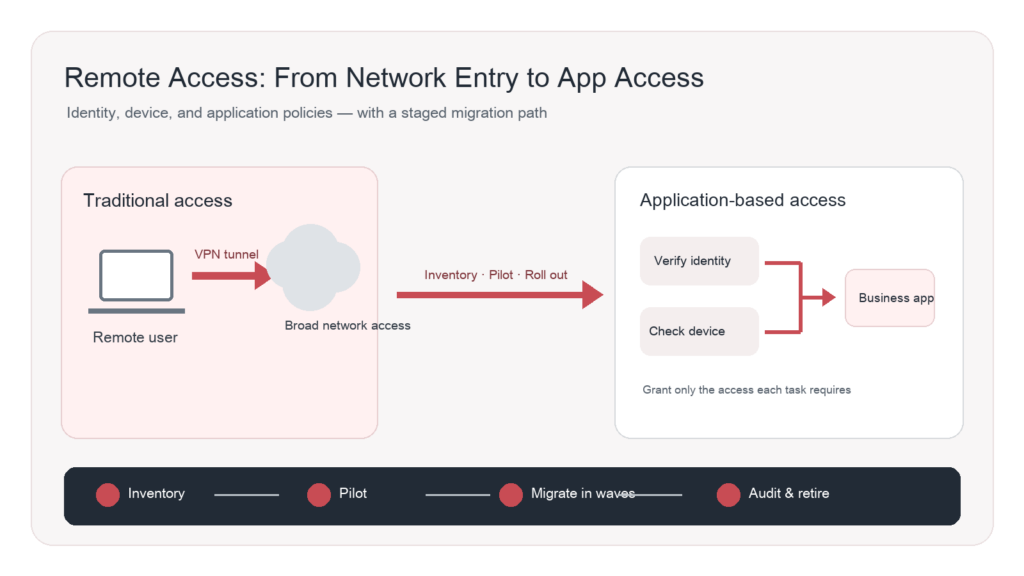
Zero Trust Network Access (ZTNA) typically builds policies around specific applications rather than simply connecting a remote device to the entire internal network. Evaluation criteria should include identity sources, MFA, device posture, user-to-application authorization, session logs, deployment locations, failover, and compatibility with legacy applications.
A ZTNA label does not guarantee that a product “continuously checks everything” or “hides every port.” Capabilities depend on architecture, deployment, and policy configuration. Ask vendors to demonstrate real user, device, and application flows. Test policy denial, log retention, access revocation, and failure handling instead of relying on concept diagrams.
Option 3: Consider SASE or cloud-delivered secure access
When employees, branches, and workloads are spread across regions—and an organization wants to consolidate internet access, SaaS access, and remote connectivity—it may assess Secure Access Service Edge (SASE) or related cloud-delivered services. Verify traffic paths, data residency, identity integration, availability, cross-region performance, support boundaries in the contract, and exit arrangements. A cloud service does not automatically resolve local networking, identity governance, or application compatibility issues.
These approaches can coexist during a transition. The objective is not to move everyone on the same day, but to sequence changes by application characteristics and risk.
Complete five assessments before selecting a replacement
1. Inventory resources. List the systems, addresses, protocols, ports, owners, data sensitivity, and access windows published through SSL VPN. Separate browser-based applications, thick-client applications, administrative access, and special cases that genuinely require broad network connectivity.
2. Map users and identity sources. Check how employees, contractors, partners, and administrators are identified. Document onboarding, role changes, offboarding, and temporary access. Confirm that directories, identity providers, and MFA can integrate with the candidate solution, and that departing or high-risk accounts can be revoked promptly.
3. Understand endpoint conditions. Record endpoint types and versions, including Windows, macOS, mobile devices, and relevant domestic operating systems. Determine whether devices are centrally managed and meet encryption and security-baseline requirements. Test installation, updates, authentication, network changes, and removal on representative devices.
4. Check capacity and continuity. Size the solution based on concurrent users, peak load, application response times, branch links, and disaster-recovery requirements. Test what happens if a gateway or control plane is unavailable: how existing sessions behave, how users are informed, who approves emergency access, and how service can be rolled back.
5. Define audit and operational responsibilities. Specify log fields, retention, alert recipients, policy approvers, patch windows, and vendor support procedures. Put these in acceptance criteria and service agreements so the team does not discover after launch that logs cannot feed its existing monitoring platform.
A safer migration sequence: validate first, then expand
Stage 1: Establish a baseline and classify applications. Record current sign-ins, access rules, device types, business dependencies, and operations. Classify each application by business criticality and access sensitivity. Pick a pilot application with clear dependencies and a manageable user group.
Stage 2: Run a parallel pilot. Configure the new access path for pilot users without disabling the existing one. Include IT staff and one business group. Test normal access, non-compliant devices, identity anomalies, network changes, log tracing, and support tickets. Make clear which path is authoritative during the pilot so users do not mix routes and create audit gaps.
Stage 3: Migrate by application and user group. Expand gradually based on pilot results. Before each group goes live, confirm an owner, communication plan, rollback conditions, and service-desk guidance. Monitor failed sign-ins, ticket patterns, application response, and policy matches. Isolate or bridge legacy applications that cannot immediately support the new model; do not mask compatibility problems by allowing access to the entire network.
Stage 4: Retire old rules and entry points. Close old SSL VPN rules and public endpoints only after target users and critical applications have been validated, emergency access has been tested, and logging and access reviews are working. Revoke expired accounts, remove temporary rules, and update network diagrams, runbooks, and disaster-recovery documentation.
Fortinet’s documentation provides one product-specific example of migrating SSL VPN access to ZTNA: some identity and network objects can be reused, application access policies are configured, and users are migrated after testing. This is an example for a particular product and architecture, not a universal procedure. It does, however, illustrate why migration should be staged rather than treated as a simple appliance swap.
Use acceptance tests, not slogans, to choose a solution
Prepare consistent demonstrations and tests: an employee can reach only approved applications; a departed account loses access; a non-compliant device is restricted or sent through remediation; privileged access requires separate approval and is logged; service can recover according to plan when an application or gateway fails; and auditors can trace which resources a user accessed at a given time.
Also verify support for legacy protocols, non-browser applications, mobile endpoints, distributed branches, and third-party collaboration. Compare total cost—including identity services, endpoint management, network changes, log integration, training, parallel operation, and ongoing support—not only appliance or subscription prices.
Conclusion: make access boundaries explicit
The purpose of an SSL VPN alternative is not to chase a new name. It is to ensure remote permissions map to real identities, appropriately managed devices, and specific business resources—with exceptions, audit, and rollback all documented. Start with an inventory and access review, then assess hardened VPN, ZTNA, SASE, or a combination based on the applications involved.
DELine can help organizations assess remote access, identity and endpoint requirements, network segmentation, and migration plans, then design validation and staged cutover around the existing IT environment. Visit DELine to learn more, or contact us to arrange a discussion.
References
- CISA, Zero Trust: https://www.cisa.gov/topics/cybersecurity-best-practices/zero-trust
- Fortinet PSIRT, FG-IR-24-015 / CVE-2024-21762: https://www.fortiguard.com/psirt/FG-IR-24-015
- Fortinet, FortiOS 7.6.3 SSL VPN tunnel mode replaced with IPsec VPN: https://docs2.fortinet.com/document/fortigate/7.6.3/fortios-release-notes/173430/ssl-vpn-tunnel-mode-replaced-with-ipsec-vpn
- Fortinet, Migration from SSL VPN tunnel mode to IPsec VPN: https://docs.fortinet.com/document/fortigate/7.6.0/new-features/155142/migration-from-ssl-vpn-tunnel-mode-to-ipsec-vpn-7-6-3
- CISA and partner agencies, Modern Approaches to Network Access Security (2024): https://www.cisa.gov/resources-tools/resources/modern-approaches-network-access-security
- CISA, Enterprise VPN Security: https://www.cisa.gov/news-events/cybersecurity-advisories/aa20-073a
- Microsoft Learn, Zero Trust identity and device access configurations: https://learn.microsoft.com/en-us/security/zero-trust/zero-trust-identity-device-access-policies-overview
- Fortinet Documentation, Migrating from SSL VPN to ZTNA: https://docs.fortinet.com/document/fortigate/7.2.3/administration-guide/78050/migrating-from-ssl-vpn-to-ztna