
Exchange Server October 2026 Update Issue: Don’t Rush to Uninstall the Patch After MapiExceptionMdbOffline
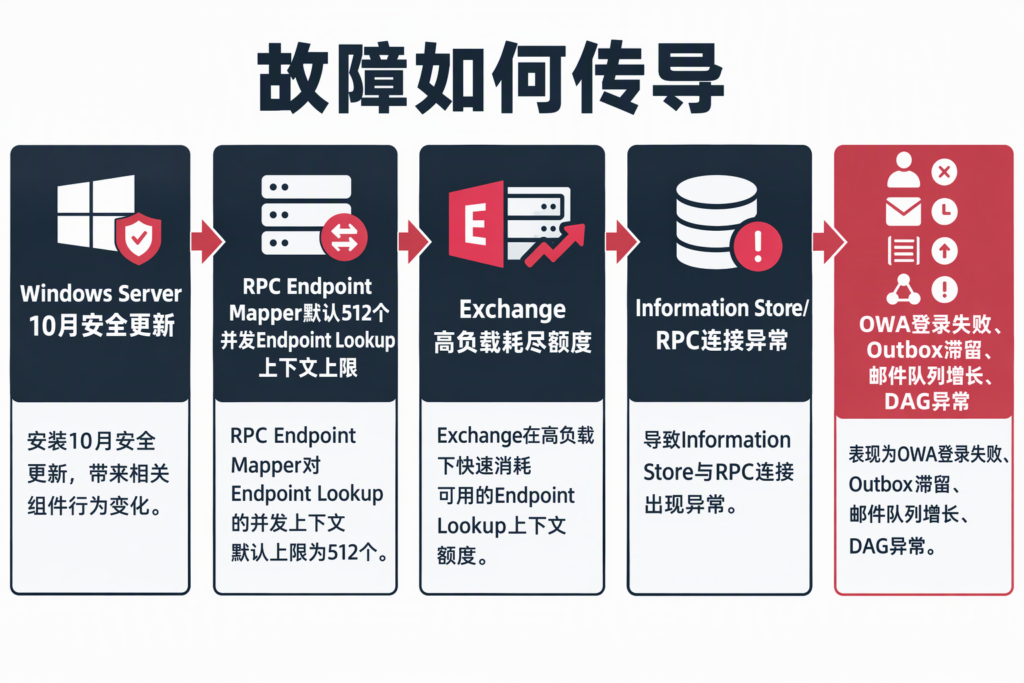
Following the October 2026 Windows Server security updates, some on-premises Exchange environments have reported symptoms that look like a partial mail-system outage: Outlook on the web (OWA) sign-in failures, messages stuck in Outlook’s Outbox, growing mail queues, and communication or quorum issues among Database Availability Group (DAG) members. A restart may help temporarily, but the issue can recur.
It is easy to suspect an Exchange cumulative update or a mailbox database problem first. Microsoft has clarified that the issue may be triggered by Windows Server updates; installing the October Exchange security update is not a prerequisite. Troubleshooting should consider the operating-system patch, RPC Endpoint Mapper, and communication between Exchange services as part of one chain—not focus only on Exchange update history.

Scope: Check Windows Server updates, not just Exchange patches
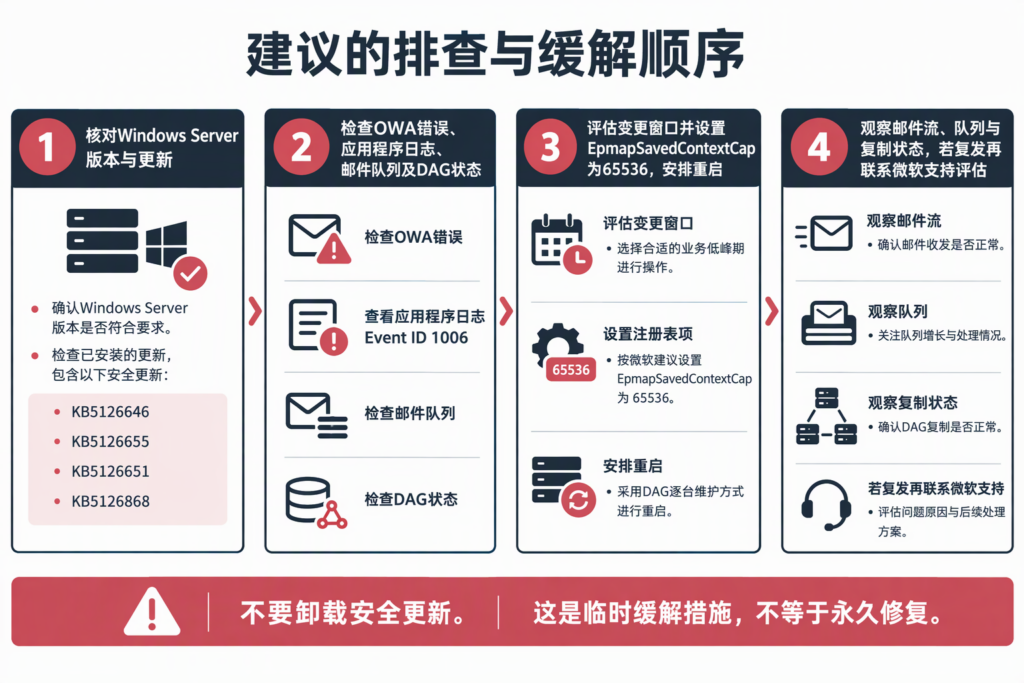
Microsoft lists these October 2026 Windows Server updates as associated with the issue:
| Windows Server version | October 2026 update |
|---|---|
| Windows Server 2025 | KB5126646 |
| Windows Server 2022 | KB5126655 |
| Windows Server 2019 | KB5126651 |
| Windows Server 2016 | KB5126868 |
Microsoft says Exchange Server 2016, Exchange Server 2019, and Exchange Server Subscription Edition running on affected Windows Server versions may be impacted. Not every server will experience the issue; severity and progression vary with workload and other environmental factors. The presence of an update alone does not prove that a server will fail, and the absence of user reports does not prove that the environment is risk-free.
Cross-check the installed-update inventory against actual symptoms, event logs, and mail-flow health. Importantly, Microsoft notes that the issue can occur even if the October 2026 Exchange security update is not installed, because the trigger is on the Windows Server side.
What does “512” mean? The Endpoint Mapper’s default concurrency limit
Microsoft’s Windows release-health notes explain that the October 2026 update introduced a default limit for Endpoint Mapper when handling Endpoint Lookup calls. For workloads such as Exchange, the default limit of 512 concurrent Endpoint Lookup calls might be insufficient. Once the limit is reached, communication between Exchange components may be affected, resulting in mailbox-access, mail-flow, or database-availability problems.
Endpoint Mapper can be thought of as a locator for RPC communication: clients and services use it to find the target RPC endpoint. Exchange components need to communicate frequently. When the limit is reached, the symptoms may appear at the application layer as a mailbox-offline error, OWA sign-in failure, or mail-delivery problem—not as an obvious “Windows update failed” message.
Microsoft’s diagnostic clues include the OWA error MapiExceptionMdbOffline: Unable to make connection to the server. (hr=0x80004005, ec=1142), Event ID 1006 in the Application log, growing mail queues, messages stuck in the Outbox, and DAG communication issues. Each symptom can have other causes. Correlate them with update timing, workload, and other logs; do not treat a single event ID as a conclusive diagnosis.
Microsoft’s temporary mitigation
Microsoft advises against uninstalling the October 2026 Windows Server security updates. Its temporary mitigation is to set the Endpoint Mapper concurrency-context limit on an affected Exchange server from an elevated Command Prompt, then restart the server:
reg add "HKLMSOFTWAREMicrosoftRpc" /v EpmapSavedContextCap /t REG_DWORD /d 65536 /fAfterward, monitor mail flow and Exchange health. If the issue recurs, Microsoft advises increasing the limit and continuing the assessment. Microsoft describes this as a mitigation, not a permanent fix. Before making the change, follow your organization’s production change process, including impact assessment, backup, and approval. In DAG environments, restart planning must account for active database copies, redundancy, and failover; maintain nodes one at a time and confirm recovery before proceeding to the next.
This is not a recommendation to modify the registry in every Exchange environment without assessment. First confirm that the Windows Server update and symptoms match the reported issue, document the current configuration and maintenance window, and plan post-change validation. Microsoft also says the registry value can be created before installing the relevant Windows update; it is read and used only after that update is installed.
An operational sequence: evidence first, change second, monitoring afterward
- Check the OS version and updates. Confirm the Windows Server version hosting Exchange and whether one of the KBs above is installed. Record update timing, server roles, and node details.
- Confirm the evidence. Check for the specified OWA error and Event ID 1006. Review Outlook’s Outbox, transport queues, mailbox-database access, and DAG health. Correlate timestamps with workload and restart history.
- Plan a controlled change. If the environment matches Microsoft’s description, assess the registry mitigation and restart plan. In a high-availability deployment, confirm healthy nodes and database copies first; avoid restarting multiple nodes simultaneously.
- Validate and monitor. After restarting, check OWA, mail send/receive, queue drainage, database replication, and DAG health. If the problem recurs, record the timeline and symptoms, then follow Microsoft’s advice to assess a higher limit or contact Microsoft Support.
A separate migration issue: don’t conflate it with the confirmed outage
The original WeChat article also mentions MRSProxy returning 401 during hybrid migrations and relays an individual report that renaming the local Administrator account restored migration. The Microsoft advisories verified for this article address Exchange instability after Windows Server updates; they do not identify renaming the local Administrator account as an official mitigation for this issue.
That anecdotal action should not be presented as a general recommendation or performed in production without identity, impact, and change-control assessment. If your organization is seeing MRSProxy 401 errors, investigate them as a separate issue by collecting migration-endpoint configuration, authentication logs, and failed-request details. Do not change the built-in local account based only on an individual report.
What this incident says about operations
The difficulty is that users see mailbox or mail-flow failures while the cause may sit in an operating-system RPC component. A restart may appear to work without proving that the underlying issue is gone. For a business-critical Exchange platform, patch management should not stop at “installation succeeded” or “the server booted.” Post-update validation should include mail flow, queues, database replication, and user access.
Mitigation values, scope, and Microsoft’s investigation status can change as advisories are updated. Before implementation, review the latest Microsoft Support and Windows Release Health pages and validate the procedure against your own version and topology. Avoid relying on outdated community advice or generalizing from a single environment.
DELine can help organizations assess Exchange and Windows Server patch impact, mail-system high availability, and incident-response processes, and develop a practical post-update validation checklist aligned with existing monitoring, backup, and change-management controls. To discuss the operational risk of an on-premises mail system or post-update service health, contact DELine.
References
Microsoft Learn: Windows Server 2022 known issues and notifications