Buying more security tools does not automatically reduce risk. Many organizations already have IDS, IPS, vulnerability scanners, WAF, log auditing, DLP, and bastion hosts in place, but still struggle to explain where each tool fits, what evidence it produces, and how alerts become action.
This article explains eight common cybersecurity tools in plain language. The goal is not to memorize product names, but to understand what each capability detects, prevents, validates, records, or governs. Once that is clear, security teams can move from a device checklist to a working detection, response, and audit loop.
A useful way to evaluate any security tool is to ask four questions: where does it sit in the architecture, what signal does it produce, whether it can take action, and how its output supports risk reduction.
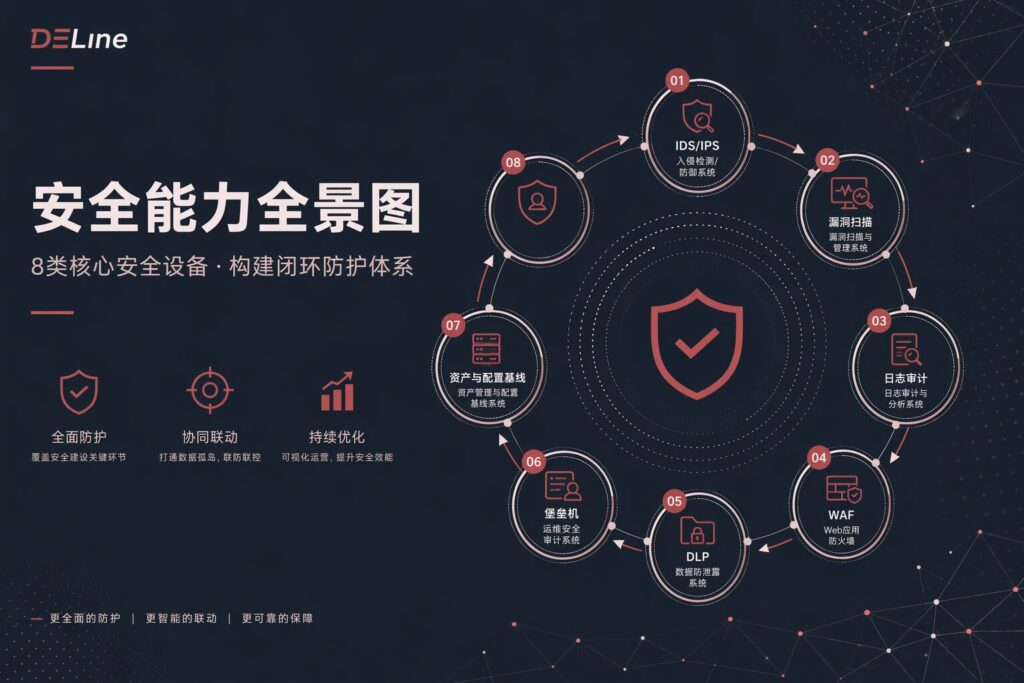
1. IDS: Detecting Suspicious Activity Without Taking Direct Action
An Intrusion Detection System, or IDS, focuses on visibility. It inspects network traffic or events and looks for known attack patterns, abnormal behavior, or signals that deviate from an expected baseline. Its main output is an alert with supporting evidence.
IDS is valuable because it helps security teams see what might otherwise remain hidden: lateral movement, scanning behavior, exploitation attempts, suspicious sessions, or traffic that requires investigation. But IDS usually does not block the traffic by itself. It is the security system’s observation layer, not the final response mechanism.
- Common mistake: treating IDS as an automatic protection layer.
- Practical approach: connect IDS alerts to SIEM, SOAR, ticketing, or response workflows so detection becomes an accountable action.
2. IPS: Turning Detection Into Prevention, Carefully
An Intrusion Prevention System, or IPS, goes beyond detection. It can drop traffic, reset connections, rate-limit sessions, or otherwise intervene when a rule or behavior indicates malicious activity.
The strength of IPS is speed. It can stop an attack before it reaches a protected system. The risk is business disruption: a poorly tuned IPS may block legitimate traffic. This is why IPS deployment should be staged. Start in monitoring mode, review hit rates, test against normal traffic, and only then enable blocking for well-understood rules.
- Common mistake: enabling broad blocking policies before understanding normal business traffic.
- Practical approach: use baselines, replay testing, allow lists, and phased enforcement to reduce false positives.
3. Vulnerability Scanning: Measuring the Attack Surface
Vulnerability scanning does not tell you that an attack has happened. It tells you where an attacker may have an opportunity. Scanners identify exposed services, weak configurations, known CVEs, missing patches, unsafe web behaviors, and other weaknesses across assets.
The scan report is not the final answer. It is a risk hypothesis that needs validation against asset ownership, software version, exposure level, and business impact. A critical vulnerability on an isolated test asset is different from the same vulnerability on an internet-facing production system.
- Common mistake: treating scan output as a static report rather than an operational workflow.
- Practical approach: connect scanning to remediation, retesting, change management, and a measurable vulnerability closure process.
4. WAF: Filtering Application-Layer Attacks
A Web Application Firewall, or WAF, protects web applications by inspecting HTTP requests and application-layer behavior. It is different from network-layer detection because it looks at parameters, sessions, request structure, and web attack semantics.
WAF is commonly used to mitigate SQL injection, cross-site scripting, malicious crawlers, suspicious request patterns, and other web-facing threats. However, default rules are rarely enough. A WAF must be tuned to the application, especially for core business APIs and frequently changing web systems.
- Common mistake: relying entirely on default policies.
- Practical approach: maintain rule versions, tune policies with log evidence, and review changes when application interfaces evolve.
5. Log Auditing: Turning Events Into Evidence
Log auditing answers one of the most important questions in security operations: who did what, to which asset, from where, and when. Logs from firewalls, servers, endpoints, operating systems, applications, identity systems, and security tools need to be collected and made searchable.
Without log auditing, an incident investigation becomes slow and incomplete. With it, teams can correlate evidence, reconstruct event timelines, support compliance requirements, and improve response quality.
- Common mistake: collecting logs without normalization, indexing, quality checks, or alert logic.
- Practical approach: define audit fields, retention requirements, time synchronization, alert thresholds, and evidence review processes.
6. DLP: Controlling How Sensitive Data Moves
Data Loss Prevention, or DLP, focuses on sensitive information rather than network attacks. It helps organizations understand how data moves, where it leaves controlled environments, and whether policy should block, warn, or record a transfer.
DLP is often used for email, instant messaging, endpoint copying, web submissions, cloud downloads, and other paths where confidential data can leave the business. Its success depends on data classification. If sensitive data is not clearly defined, DLP policies become either too noisy or too weak.
- Common mistake: starting with blocking rules before defining data categories and business exceptions.
- Practical approach: begin with high-value data flows, classify sensitive fields, tune policies, and expand coverage gradually.
7. Bastion Host and Operations Auditing: Governing Privileged Access
A bastion host, often paired with operations auditing, brings privileged access under control. It centralizes administrative entry points, records sessions, enforces access policies, and helps answer what high-privilege users did during maintenance or incident response.
This matters because many incidents do not stop at the first vulnerability. Once attackers obtain credentials or access, they often move laterally. A bastion host reduces uncontrolled access paths and preserves evidence for review.
- Common mistake: managing login access but ignoring command review, approval flow, and session evidence.
- Practical approach: require bastion access for critical systems, connect it to approvals, and rehearse evidence retrieval before an incident.
8. Asset, Vulnerability, and Configuration Management: Making Improvement Continuous
Security operations need more than individual tools. Asset management, vulnerability management, and configuration baselines provide the operating model that connects findings to improvement. They help teams prioritize what to fix first and measure whether risk is actually going down.
When scanning data, logs, alerts, and change records all refer to a consistent asset model, teams can make better decisions. They can identify business owners, prioritize exposed systems, measure remediation time, and avoid treating every alert as equally urgent.
- Common mistake: leaving asset data fragmented across multiple systems.
- Practical approach: define asset IDs, tags, ownership, risk scoring, and security operations dashboards.
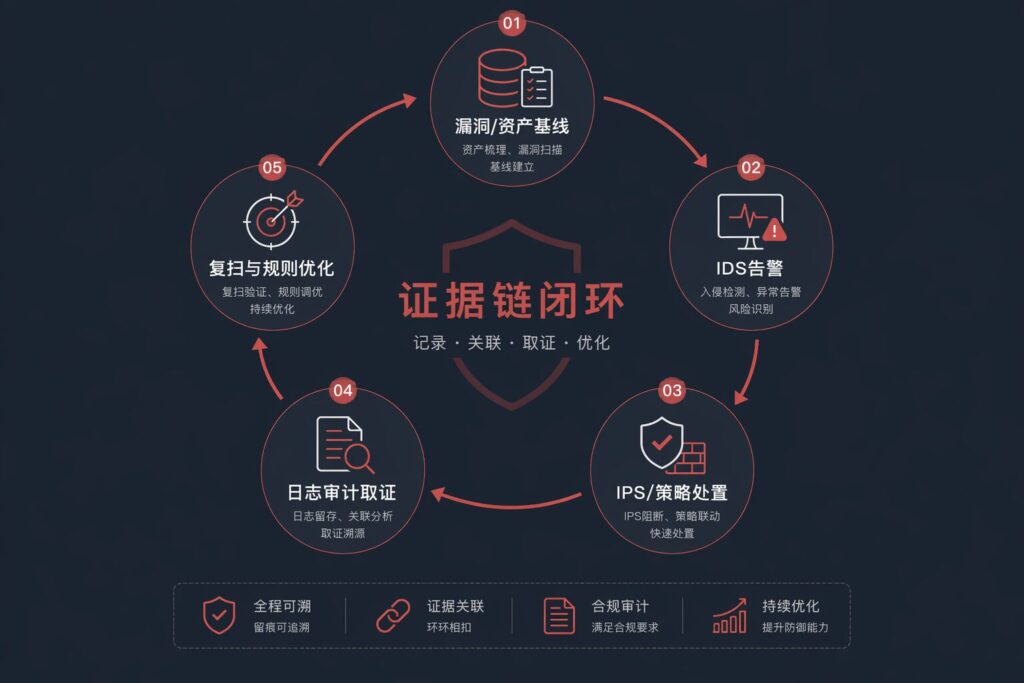
From Tool List to Evidence Chain
The practical way to connect these tools is to think in terms of evidence chains, not alert piles:
- Exposure validation: vulnerability scanning and baseline checks show where the organization may be exposed.
- Detection: IDS, WAF, endpoint signals, and related tools show what may be happening.
- Prevention and control: IPS, WAF policy, segmentation, access control, and DLP reduce the chance of impact.
- Audit and review: log auditing and operations auditing preserve evidence for investigation, compliance, and continuous improvement.
The point is not to send every alert to the same chat group. The point is to define the input, output, owner, response path, and success metric for each stage.
Selection Checklist: Evaluate Operations, Not Only Features
- Accuracy and usability: Can teams understand alerts and tune false positives?
- Evidence quality: Are the fields needed for correlation and investigation complete?
- Response loop: Can alerts become tickets, actions, reviews, and measurable outcomes?
- Business impact control: Is there a phased enforcement strategy for active blocking?
- Continuous operation: Are scanning, retesting, policy updates, and audit reviews repeatable?
How DELine Helps Turn Security Tools Into an Operating System
Many organizations already own several security products. The hard part is making them work together: mapping tools to business risk, defining evidence chains, tuning response workflows, and measuring whether risk is decreasing.
DELine helps enterprises assess existing network and security architecture, design tool integration paths, and build practical security operations workflows. We can support security tool selection, IDS/IPS/WAF/log auditing integration, evidence-chain design, compliance-oriented auditing, and AI Agents that assist with alert triage, ticket routing, risk summaries, and post-incident review.
If your team is planning security hardening, SOC improvement, or a more measurable security operations program, start with the evidence chain: what each tool sees, what it proves, who acts on it, and how the organization verifies the result.