You Don’t Need to Click Anymore: Zero-Click Phishing via ZimReaper and How to Protect Your Organization
The Short Answer
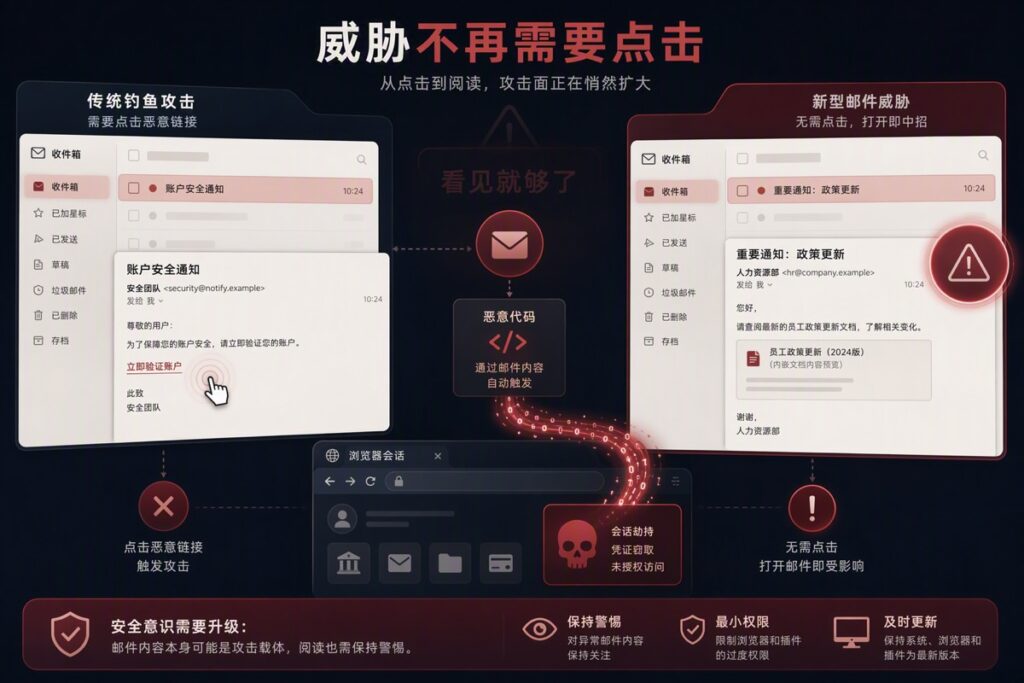
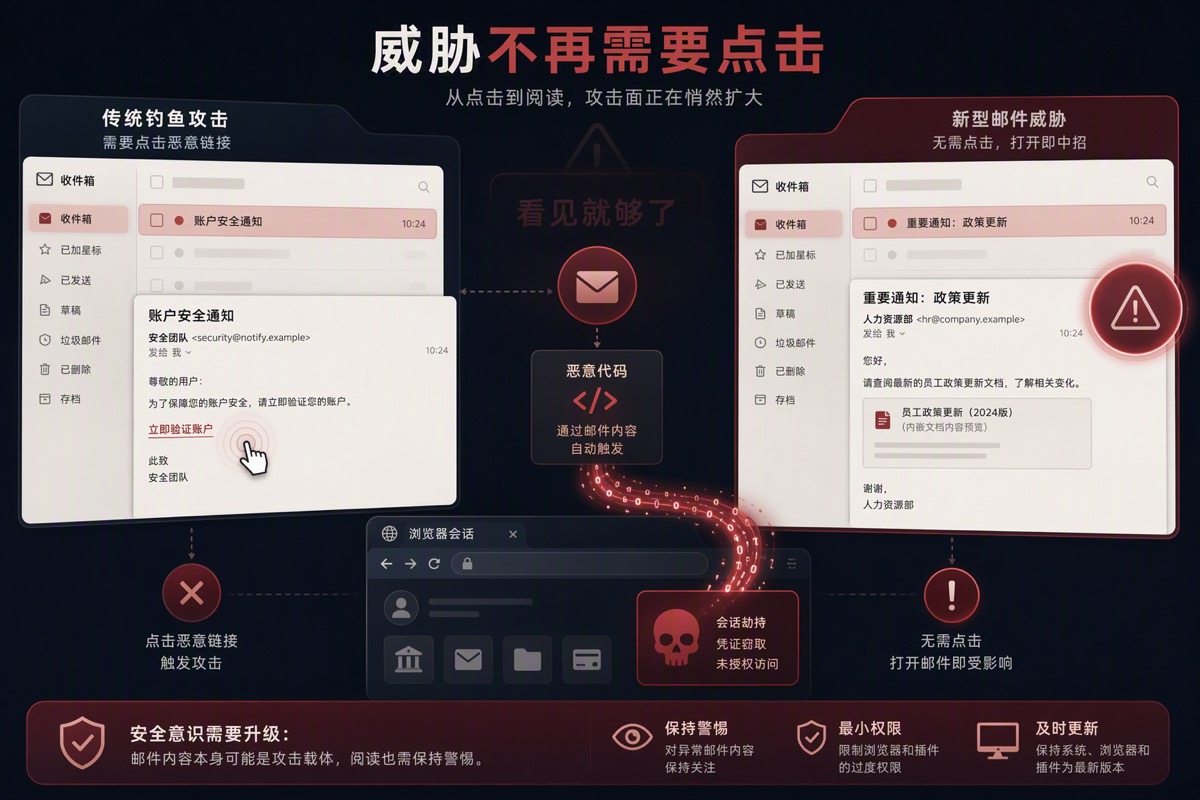
ZimReaper (CVE-2025-66376) proves that simply viewing or previewing an email in a vulnerable Webmail interface can trigger malicious code execution — no clicking required. This zero-click attack exploits the gap between what security sanitizers remove and what browsers re-assemble, running inside an already-authenticated session where 2FA has already been passed. This article explains how it works, why traditional phishing defenses fail against it, and how Microsoft 365 Exchange Online provides enterprise-grade protection.
Who Should Read This
- IT administrators managing self-hosted or on-premises email systems
- Security teams evaluating zero-click attack risks
- CISOs and compliance officers concerned about supply-chain email risks
- Any organization considering a migration to cloud email security
What Happened: The ZimReaper Attack Chain
In July 2025, multiple government agencies jointly released a security advisory (AA26-204A) detailing a campaign attributed to Russian state-backed threat actor LAUNDRY BEAR. The attack exploited CVE-2025-66376 — a stored XSS vulnerability in Zimbra Collaboration Suite’s Classic UI.
The attack required no user action beyond opening or previewing an email:
- No link clicked — the malicious code was embedded in the email body itself
- No attachment opened — the attack surface was the email rendering engine
- 2FA already passed — the code executed within the authenticated browser session
This means the traditional “three-layer defense” (don’t click links, don’t open attachments, enable 2FA) failed simultaneously.
Why Traditional Defenses Don’t Work
The ZimReaper exploit uses a technique called “sanitizer bypass via fragment recombination”:
The attacker constructs an HTML email with dangerous tags split apart using CSS @import fragments. When the email sanitizer removes the CSS fragments (thinking it’s cleaning the content), the remaining pieces recombine into valid executable tags like svg onload.
The sanitizer checks pre-removal strings; the browser executes post-removal semantics. Danger lives in the gap between them.
Once the malicious JavaScript runs inside the authenticated Zimbra session, it can:
- Read CSRF tokens and bypass authentication
- Obtain 2FA scratch codes
- Create an application-specific password — a permanent backdoor that never expires
- Enumerate the Global Address List
- Search and export 90 days of emails
The application-specific password is particularly dangerous — it turns a browser-session exploit into persistent, session-independent access.
What This Means for Your Organization
For Regular Users
- No action required, no mistake made. The user didn’t click a bad link — they just read an email. Traditional security training no longer covers this attack surface.
- Email is the new attack vector. Any Webmail with weak HTML rendering controls is at risk.
For IT and Security Teams
- Patch management is your first line. CVE-2025-66376 was patched in Zimbra 10.0.18 / 10.1.13 (November 2025). Many organizations never applied the update.
- Detection must shift. Look for anomalous DNS queries, unusual application-specific password creation, and bulk email export activity.
- Application passwords must be auditable. Know what application passwords exist, who created them, and when.
M365 Exchange Online: Built-in Protection Against Zero-Click Attacks
Exchange Online Protection (EOP)
EOP provides multi-layered email filtering before messages reach user inboxes:
- Anti-malware engines — multiple parallel scanners with real-time signature updates
- Anti-spam filtering — sender reputation, content analysis, behavioral pattern detection
- Connection filtering — IP reputation scoring for sending servers
- Zero-hour auto purge (ZAP) — automatically removes malicious messages already delivered
HTML Rendering and XSS Protection
Microsoft applies stricter HTML email sanitization than most self-hosted systems:
- Safe Links — scans and rewrites URLs even in the background
- Safe Attachments — detonates attachments in sandbox environments
- Email rendering sanitization — continuously updated cleansing engine for HTML content
Identity and Access Security
- Conditional Access — context-aware MFA enforcement based on location, device, and risk signals
- MFA enforcement policies — can mandate MFA for all users
- Application password management — administrators can view and revoke all application-specific passwords centrally
Self-Hosted vs. Exchange Online: Security Comparison
| Security Dimension | Self-Hosted Zimbra / Exchange | M365 Exchange Online |
|---|---|---|
| Patching and updates | Manual, often delayed | Microsoft auto-updates |
| Anti-spam/phishing | Requires third-party gateway | EOP built-in multi-layer filtering |
| HTML rendering protection | Self-managed sanitizer, bypass risk | Continuously updated Microsoft engine |
| Zero-day response | Wait for vendor patch | Microsoft Security Response Center |
| Data exfiltration detection | Requires custom SIEM rules | Microsoft 365 Defender integration |
| Identity security | Additional MFA deployment required | Built-in Conditional Access + MFA |
| Security operations | Dedicated security team needed | MS 365 Defender unified monitoring |
Migration Is Not the Endpoint
Switching to Exchange Online doesn’t mean security is automatic. Organizations must still:
- Configure EOP policies properly (defaults are often too permissive)
- Enable Conditional Access policies
- Turn on audit logging for traceability
- Train employees for cloud email security awareness
Moving from “Don’t Click” to “Don’t Let Bad Mail In”
When email body rendering becomes an attack vector, the frontline shifts from user behavior to system architecture. The real answer: Don’t let email execute malicious code. This requires email system security design, cloud-native multi-layer protection, and continuous security operations.
Self-Assessment Checklist
- Is your organization using a self-hosted or cloud email system?
- If self-hosted, what is your patch update cadence?
- Does your email security gateway detect malicious code embedded in email bodies?
- What percentage of users have MFA/2FA enabled?
- If someone created an application-specific password today, how quickly would you detect it?
- Is Exchange Online migration on your roadmap?
How DELine Can Help
DELine, as a Microsoft partner, provides end-to-end email security services:
- Email Security Assessment — evaluate your current email system’s patch status, configuration risks, and security policies
- M365 Exchange Online Migration — smooth migration from self-hosted systems with EOP policy configuration, Conditional Access, and audit setup
- Email Security Hardening — security hardening and operational recommendations regardless of email platform
- Managed Security Operations — continuous monitoring of email security posture
Contact us at https://www.de-line.net/contact-us/ for a complimentary email security health check.
Sources: Multi-government joint cybersecurity advisory AA26-204A, Proofpoint TA488 analysis, Unit 42 CL-STA-1114 report, Zimbra patch notes (10.0.18 / 10.1.13, November 2025).