When the cloud comes back, is the business ready to come back?
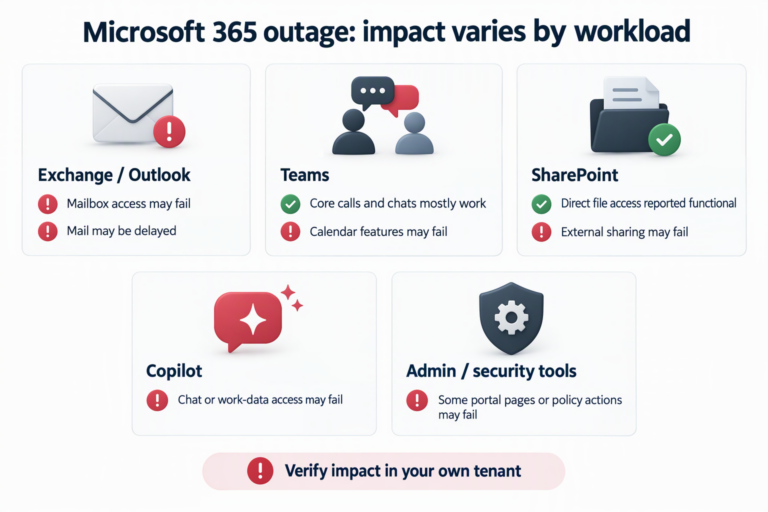
An employee cannot open Outlook before an important meeting. They switch to Teams, only to find that calendar or meeting-related functions are also unreliable. They turn to Copilot to retrieve context from email, but features that depend on mailbox data are affected too. From the user’s perspective, several products have failed at once. From the organization’s perspective, the deeper question is whether apparently separate tools share the same identity, network, connection-processing or data dependencies.
The Microsoft 365 disruption that began on November 12, 2026 put that question in sharp focus. Microsoft’s status account first reported Exchange Online mailbox-access problems, then said the issue could affect service connectivity in other regions. A preliminary incident report dated November 15 identified three factors behind the gateway failure: a latent defect in a fix prepared specifically for Microsoft 365 networking gateways and deployed from July; a Teams failover to the primary gateway that also supports Exchange Online about 15 hours before the outage, changing traffic patterns; and about 14% of relevant gateway capacity temporarily unavailable because of an unrelated issue the day before. Microsoft said the failure cascaded across remaining servers, with more than 80% unresponsive at the lowest point. The report is preliminary; detailed mechanisms and corrective actions remain subject to the final review. Microsoft’s public service-status page currently reports all products operational. Reporting described effects on Outlook, Teams, Copilot and some public services. However, neither outage reports nor the breadth of coverage establish a precise total of affected users or the business loss at each organization. Microsoft’s preliminary incident explanation (Charles Lamanna, Microsoft executive); Microsoft service status; AP’s report on the impact
The useful question for a business is not simply, “Should we leave the cloud?” It is: “If a cloud service becomes unavailable, which essential activities stop together, and do we have an alternative that has actually been tested?”
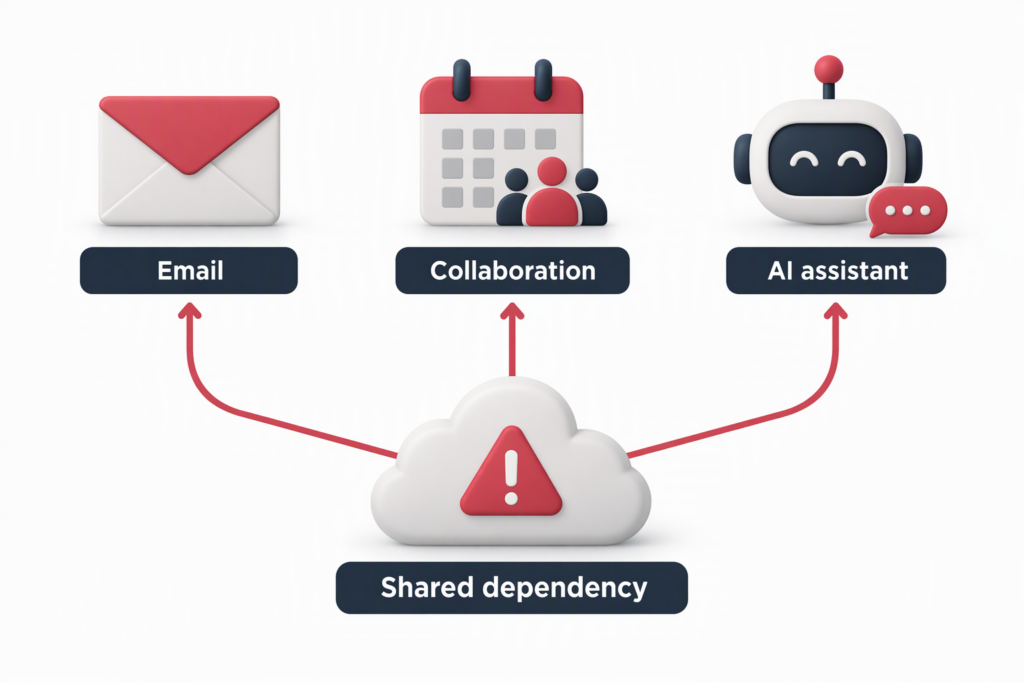
A single point of failure does not have to share a product name
Organizations often procure and deploy technology as a list of products: email, meetings, document storage, and an AI assistant. Product boundaries do not necessarily match failure boundaries. Several functions may share identity services, network entry points, connection pools, directories, DNS, email or calendar data—or rely on the same provider’s underlying platform.
Microsoft’s preliminary incident report published on November 15 describes the failure more specifically than the initial updates. A defect in a network-gateway fix could leave servers unresponsive under particular load conditions; Microsoft says the fix had been prepared for Microsoft 365 gateway servers and began deploying in July. About 15 hours before the outage, Teams automatically failed over to the primary gateway that also supports Exchange Online, changing traffic patterns. At the same time, about 14% of that gateway’s capacity was temporarily unavailable because of an unrelated issue from the previous day. Microsoft says the lost capacity alone remained within headroom, but the combination exposed the latent defect; redirected traffic then overloaded remaining endpoints and spread the failure across the gateway infrastructure. The report says more than 80% of servers were unresponsive at the lowest point and that safeguards normally used to isolate capacity partitions did not contain this cascade. This is Microsoft’s preliminary incident account, not a completed independent audit or final root-cause report. Microsoft’s preliminary incident explanation; BleepingComputer’s report on the preliminary findings
The differences between products also matter. Microsoft said that some services, including Teams, OneDrive, SharePoint and Office apps, could fail out of the affected gateway and recovered earlier; Exchange Online could not use the same path because of scale. This does not mean every Microsoft 365 service was completely unavailable, but it does show that products in the same platform can have different recovery routes and shared dependencies.
For a business-impact review, that is more useful than simply counting applications. Ask whether identity, email, network, data and management planes are shared—and whether the fallback also relies on the same sign-in service, network path or administrator account. If the common dependencies of primary and backup systems remain hidden, apparent redundancy may simply add another interface inside the same failure domain.
Turn “cloud redundancy” into a business test
For most organizations, buying a fully separate platform for every SaaS application is costly and complex, and may not reduce risk. A more practical starting point is to define recovery from the business outcome backward, rather than from a product inventory forward.
List the activities that must continue during a disruption: urgent customer communications, production and logistics coordination, payment approvals, on-call escalation, or employee-safety notifications. For each activity, define the maximum tolerable interruption, acceptable data loss, accountable owner and conditions for activating a fallback. An application’s recovery time objective does not automatically equal the time needed to restore the business. If employees do not know when to switch, where to find contact details, or who can approve a temporary process, work may remain stalled even after the technology is back.
Then map dependencies: which SaaS functions, identity providers, DNS, network circuits, endpoints, vendor-support channels and internal approvals support each workflow? Mark shared dependencies to reveal how apparently separate applications could fail together. For critical activities, establish at least one contact route that does not depend on the affected platform—for example, a security-approved phone tree, SMS, or offline emergency contacts and operating instructions. Define what information may be shared over that route so that emergency communication does not create a data-leakage risk.
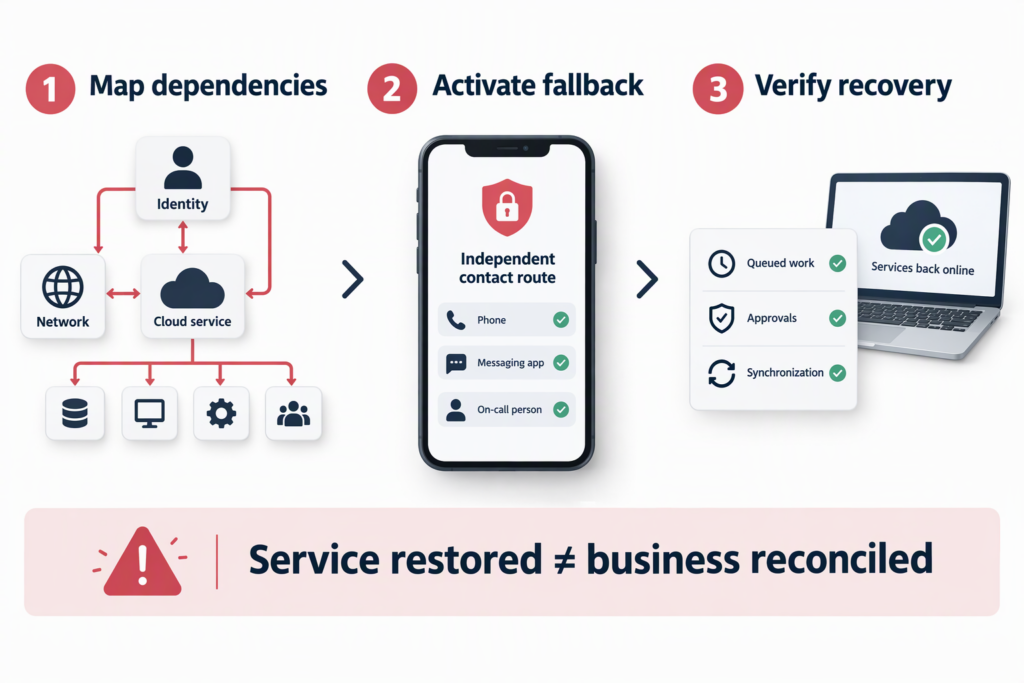
A fallback has to pass the “fresh sign-in” test
A backup tool that is already signed in on someone’s desktop may not be available during an incident. People may need to authenticate again. If the backup platform’s identity provider, single sign-on, device management or account-recovery email depends on the same cloud ecosystem, knowing the password will not help. An exercise should start from a clean device or new session and test how people sign in, who has access, how teams make contact and where they retrieve the current procedure.
The exercise should also test the organization’s minimum operating mode: what can pause, what can be recorded manually, which actions require a named approver, how temporary data is protected, and how it will be reconciled after service returns. When mail is delayed, duplicated or queued, repeatedly resending messages without checking status can create duplicate tickets, payment instructions or conflicting customer updates. Recovery procedures should tell staff to confirm delivery status before retrying and assign an owner to each business system’s consistency checks.
A cloud outage and data loss are different questions
An inaccessible service does not necessarily mean data has been lost. Conversely, a service coming back online does not prove that every business record or automated workflow has been reconciled. Organizations should separately verify service availability, data integrity and process completeness: Did messages arrive? Were calendar invitations updated? Did approvals queue? Did integrations resume? Are permissions and security alerts being handled normally?
This is why backup, disaster recovery and business continuity should not be treated as interchangeable. Backup answers whether data can be recovered. Disaster recovery concerns how systems return to operation. Business continuity asks how people keep essential work moving before those systems are restored. The three are connected, but none substitutes for the others. A customer cannot repair a cloud provider’s underlying platform, but an organization can reduce its own workflows’ dependence on a single access path and assign responsibility for post-recovery checks.
Build a small, real continuity check
Organizations can begin with four actions without first launching a major platform migration:
- Map critical workflows and shared dependencies. Select activities that cannot remain unavailable for long across customer service, production, finance, HR and security response. Record the applications, identity, network and third-party dependencies, and flag shared services.
- Define a minimum operating mode. For each workflow, identify an owner, activation criteria, acceptable manual steps, data-protection requirements and the method for entering or reconciling records later. “Contact IT” or “use the backup system” is not an executable procedure on its own.
- Test an independent contact route. Assume that primary email and collaboration tools are both unavailable. Confirm that staff can find current emergency contacts, on-call information and instructions. Check that the fallback’s identity and communications do not share an unassessed single point of failure.
- Exercise failover and return to normal. Use a tabletop or a limited practical exercise to test timing, permissions, information consistency and vendor escalation. After recovery, check message queues, approvals, calendars, file synchronization and security monitoring. Do not equate a green service indicator with a fully reconciled business.
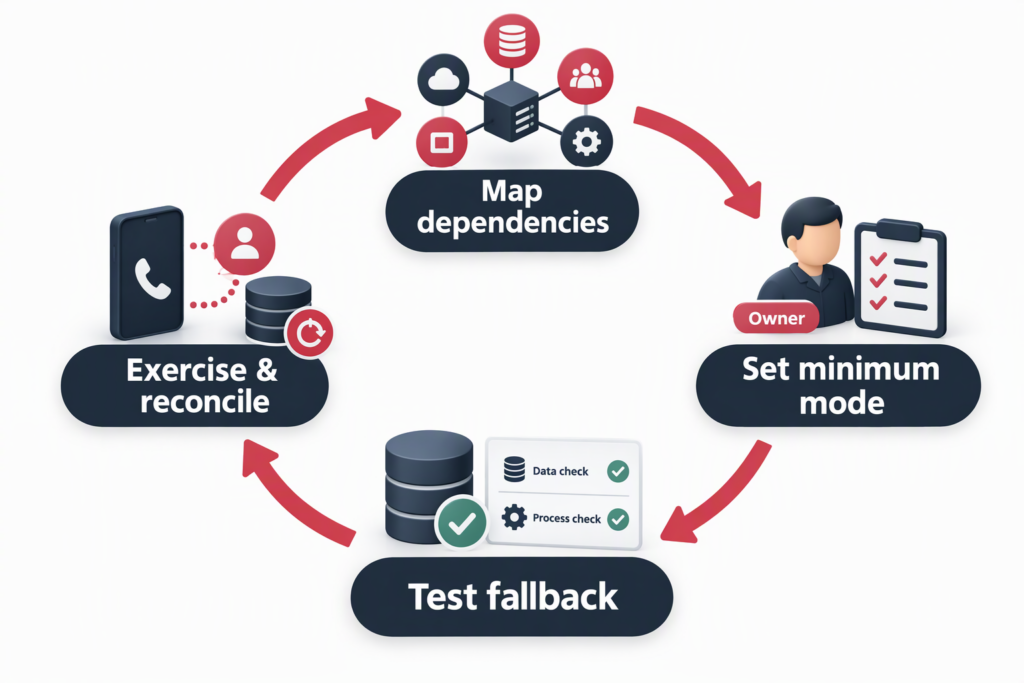
Concentrated efficiency needs deliberately designed resilience
Cloud concentration can bring scale, consistent administration and faster deployment. It also means one platform incident can cross product boundaries and interrupt several workflows. A global outage does not prove that cloud services are inherently unreliable, nor does it justify concluding that every organization should migrate everything. It is better understood as a stress test: confirm dependencies, set tolerable interruption boundaries, and prove that fallback arrangements can operate independently.
Leaders decide which activities must continue, how long an interruption is acceptable and what resilience investment is justified. Business owners translate those priorities into workflows, permissions and communication arrangements. IT and security teams maintain the dependency map, alternate access paths, recovery checks and exercise records. Continuity planning becomes operational only when each role has a clear responsibility.
DELine can help organizations review dependencies across Microsoft cloud and IT infrastructure, assess continuity risks in identity, collaboration and security workflows, and plan practical response and recovery exercises around their existing environment. To assess your organization’s cloud dependencies and business-continuity readiness, contact DELine or visit the DELine website.
References
- Microsoft executive Charles Lamanna: preliminary Microsoft 365 incident explanation (November 16, 2026)
- Microsoft 365 Status: service updates during the incident
- Microsoft service status
- AP: Microsoft outage highlights risks of relying on one technology provider
- BBC: How the Microsoft outage was felt worldwide
- BleepingComputer: Microsoft says months-old bug caused global Microsoft 365 outage