A multi-region disruption that started with Exchange Online
This was not simply an Outlook client problem. On 12 November, Microsoft first acknowledged reports that users in the Americas could not access Exchange Online mailboxes. The company later warned that Microsoft 365 connectivity issues could affect users in any region. TechCrunch reported how the disruption spread from Outlook and Teams into email, files, Copilot, security and administration tools. ABC News Australia also recorded Microsoft’s shift from an Americas-focused notice to a warning about any region.
At the time this article was checked on 14 November, Microsoft’s public status page still listed Microsoft 365 (Business or Enterprise) as Service degradation. Its latest detailed update reports broad recovery and stability, but says service is still being restored to remaining customers and regions. Microsoft says it addressed the underlying issue and brought services back gradually, validating stability at each stage. This is a recovery in progress, not evidence that every tenant or workload has returned to normal.
The impact is not all-or-nothing
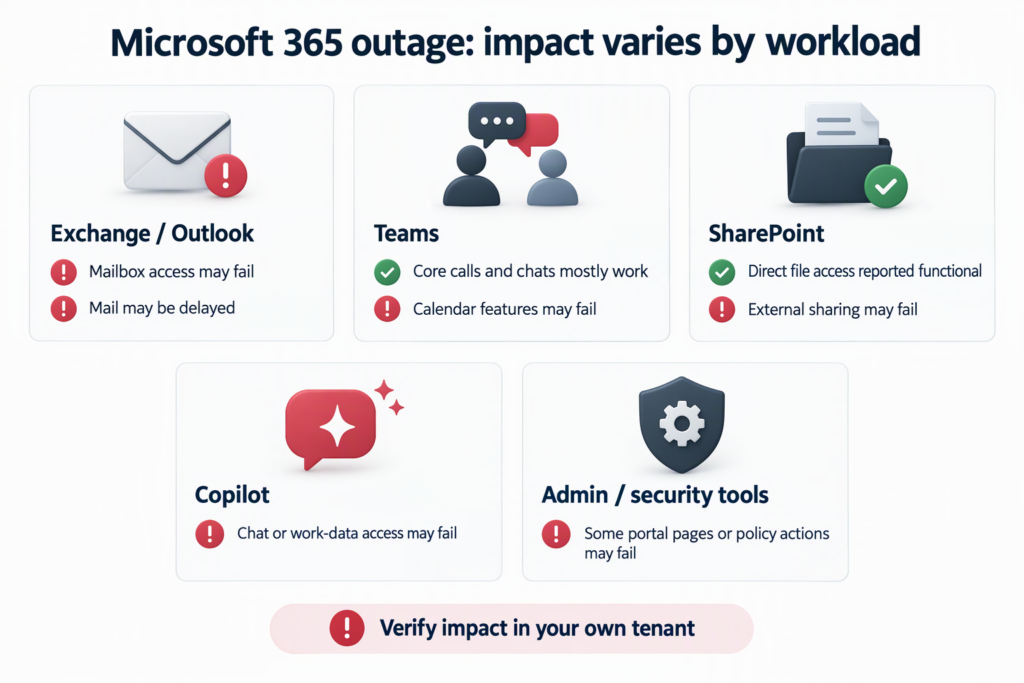
Microsoft’s service-health notice says that features depending on Exchange Online and email services may be affected, while features that do not depend on Exchange can remain functional. The exact impact should be checked against the current notice and each tenant’s own observations.
- Exchange Online and Outlook: Users may be unable to access mailboxes through Outlook on the web, Outlook desktop (MAPI), Exchange ActiveSync or REST-based connections. Email delivery may be delayed.
- Teams: Microsoft said most core functions—including joining calls and meetings, group chats and channel messages—were not affected in the status notice. Exchange-dependent calendar scheduling, invitations and meeting edits could fail. Some Copilot, contact-sync and private/shared channel operations could also be affected.
- SharePoint Online: Access to files stored directly in SharePoint remained functional in Microsoft’s notice. Some external sharing and Exchange-dependent features could fail.
- Copilot and administration/security tools: Copilot Chat might not load or return responses, or might be unable to access work email, calendars and files. Microsoft also listed possible impacts to admin-center pages and workloads such as Defender XDR, Intune, Purview, Planner, To Do, Power BI and Universal Print.
These are Microsoft-reported scenarios, not a claim that every customer experienced every symptom. A public service-health notice gives the broad picture; administrators still need to confirm impact in their own tenant.
What Microsoft says happened so far
Early updates described elevated infrastructure load. Microsoft said this was not driven by an overall increase in traffic: a number of servers had become unexpectedly unavailable, putting more pressure on the remaining infrastructure. BBC’s report on Microsoft’s early updates also described a configuration test associated with servers failing automated health checks and becoming unavailable. These were interim investigation details, not the complete cause.
Microsoft’s later status statement added a more specific explanation: the incident was introduced by an issue during an earlier network-capacity upgrade that surfaced after a more recent network change. Microsoft said it had addressed the underlying issue and was restoring service to the remaining customers and regions. It also described the event as a technical issue unrelated to cyber activity or AI/agents. The full Post-Incident Report is still pending; Microsoft’s statement is the current public explanation, not the complete technical review.
A separate Microsoft 365 outage in November 2024 was later attributed by Microsoft to a change that caused an influx of retry requests routed through servers, as BleepingComputer reported. That history is useful context, but it does not establish the cause of this 2026 incident. Similar-looking service disruptions can have different underlying mechanisms.
What enterprise IT teams should do
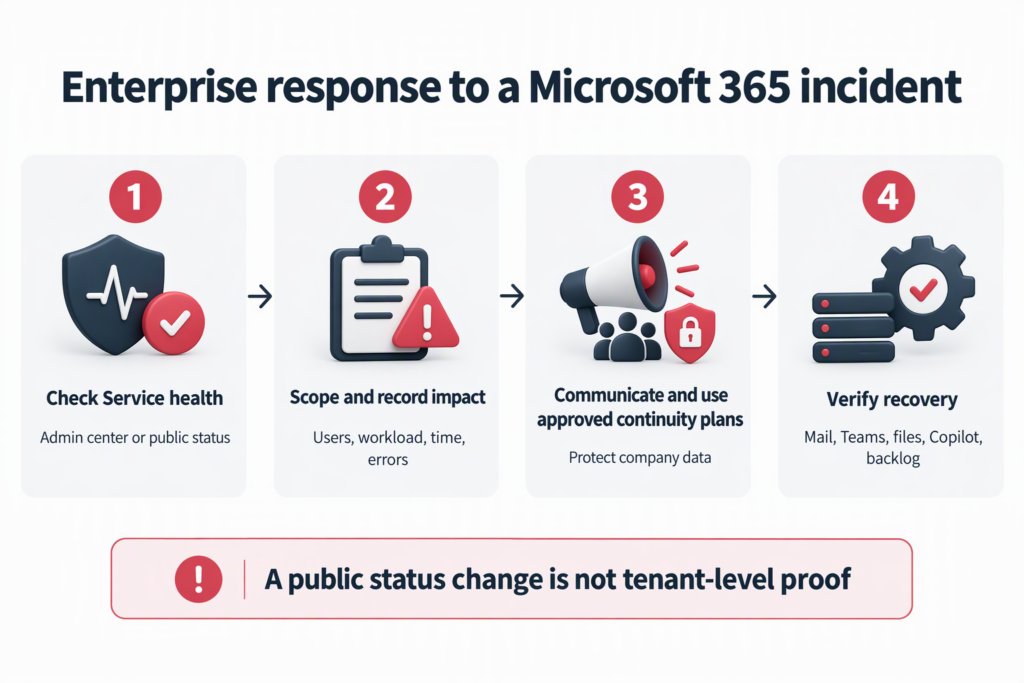
- Check both public and tenant-level status. Administrators should review Health > Service health in the Microsoft 365 admin center. If that is unavailable, use Microsoft’s public status page. If the tenant’s symptoms are not listed, follow Microsoft’s service-health guidance to report the issue.
- Record impact by workload. Track mail flow, Outlook clients, Teams meetings and calendars, SharePoint files and external sharing, and Copilot separately. Record start time and time zone, users and locations affected, error messages, recovery time and the business process involved. “Office is down” is not enough detail for support or an internal review.
- Communicate confirmed facts and use approved alternatives. Tell employees what is known, what remains uncertain, when the next update is expected and where to report symptoms. Use only continuity arrangements approved by the organization; do not move company data to personal email, unapproved cloud storage or consumer AI services.
- Validate recovery before closing the incident. Test mail send/receive and delayed queues, key Teams workflows, SharePoint file access, Copilot and relevant admin/security workloads. A green public status alone does not confirm that every tenant, feature or backlog has recovered.
Supplement: an SLA credit is not automatic compensation
A public outage notice does not by itself establish that a tenant qualifies for an SLA credit. Check the applicable subscription, service definition, measurement rules and exclusions; retain the incident ID, downtime, affected resources/users/locations and error evidence. Direct Microsoft customers should use the Microsoft 365 business support route; customers whose subscriptions are all purchased through a CSP should contact their partner and consult Microsoft’s Partner Center credit guidance. Where the applicable billing period is a calendar month, a November 2026 incident would generally need a complete claim by 31 December; confirm the actual deadline in the applicable Online Services SLA. An approved credit applies to eligible service fees; it is not automatic cash compensation or reimbursement for business losses.
Turn an outage into a continuity exercise
A cloud status page, the availability of an individual product and the recovery of a business process are different measures. Organizations should keep tenant-level incident timelines, approved fallback communications, mail-backlog handling and recovery tests within their IT service-management process. Prioritize critical workflows, document decisions and update the service desk’s runbooks after the event. Microsoft’s post-incident report may clarify the provider-side cause; tenant records remain essential for customer impact, internal lessons and any contract review.
DELine’s public service pages describe Microsoft 365 cloud-tenant management and migration, as well as business IT helpdesk support. Organizations reviewing tenant operations or support paths can learn about DELine’s Microsoft 365 solutions and IT Helpdesk services, or contact DELine to discuss their requirements.
References
- Microsoft: Microsoft 365 public service status
- Microsoft: detailed Admin Center Status feed
- ABC News Australia: Microsoft apologizes and reports broad recovery
- BBC: Microsoft users report Outlook, Teams and Copilot connectivity issues
- TechCrunch: Microsoft’s email outage expands across cloud services
- BleepingComputer: the separate 2024 Microsoft 365 outage and Microsoft’s later explanation
- Microsoft Learn: check Microsoft 365 service health
- Microsoft: Online Services SLA
- Microsoft Learn: Microsoft 365 support
- Microsoft Learn: request a credit from Microsoft (CSP guidance)