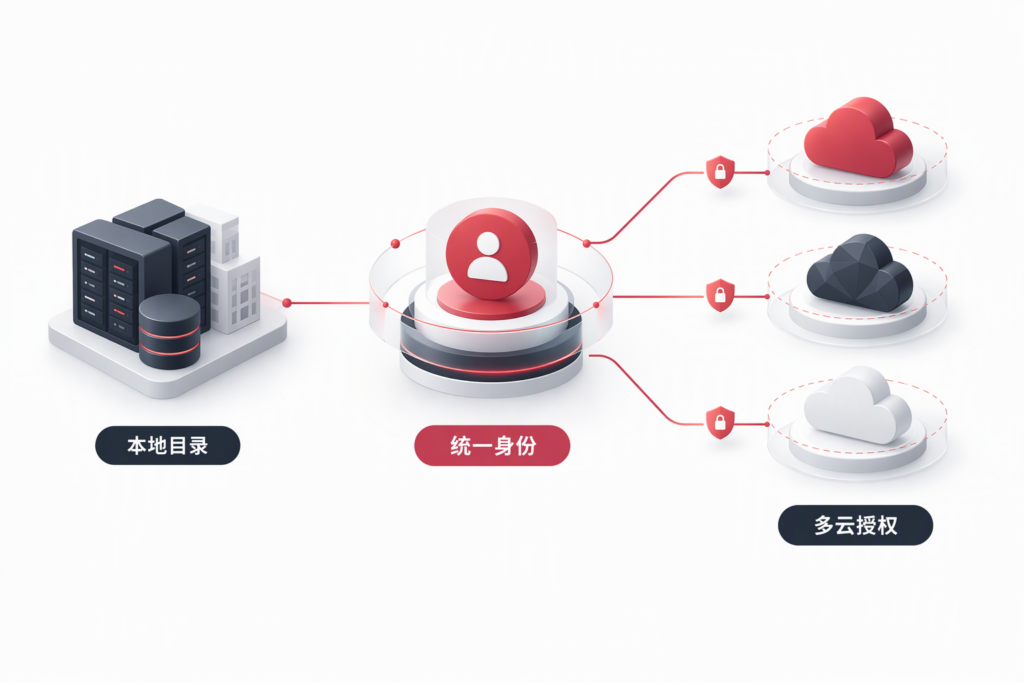
Why unify identity, not just sign-in?
Corporate identities are often scattered across on-premises Active Directory, Microsoft 365, Azure, and cloud platforms such as Alibaba Cloud and Tencent Cloud. When an employee leaves, IT may have to disable accounts one system at a time. Administrators also maintain multiple passwords, MFA configurations, and role assignments. The challenge is not simply the number of sign-in prompts: identity lifecycle, authentication policy, and cloud authorization often operate separately.
Microsoft Entra ID can act as an identity control plane. An existing on-premises directory can continue to provide domain services while selected users and groups are synchronized to Entra. Cloud applications can trust Entra as an identity provider (IdP), and each cloud provider’s IAM service can map the verified identity to that provider’s roles. This centralizes the authentication entry point and helps coordinate identity lifecycle, while preserving each cloud’s own resource-authorization boundary.
Unifying identity does not mean moving every cloud permission into Entra. Nor does it automatically synchronize every account, permission, or data set. Entra helps establish who the user is and how the user authenticates; the cloud provider’s IAM determines what that identity may do after sign-in.
1. Establish the hybrid identity foundation
For an organization that still uses on-premises Active Directory Domain Services (AD DS), first identify the authoritative source for employee identities and define the rules for attributes such as UPN, email address, and group membership. Then evaluate Microsoft Entra Connect Sync and Microsoft Entra Cloud Sync to synchronize the selected users, groups, and required attributes to Entra ID. Cloud Sync uses lightweight on-premises agents together with cloud-based configuration. It supports scenarios such as multiple forests, but its capabilities should be compared with the current Microsoft feature matrix and the organization’s topology; the product name alone is not a reason to replace an existing Connect Sync deployment.
Before synchronization, resolve duplicate UPNs, email addresses, and proxy addresses. Define which organizational units and groups are in scope, then pilot with a small group. Validate password hash synchronization, identity matching, group membership, and the process for disabling a departing user’s account. Synchronization is not a backup, and copying every directory object to the cloud without filtering is rarely a sound starting point. For on-premises applications, separately confirm whether the application supports Entra SAML or OIDC directly, or whether an application proxy or another connectivity design is required. Microsoft Entra Application Proxy is a premium capability.
2. Connect cloud platforms with standard federation protocols
Keep two responsibilities distinct: authenticating the user’s identity and authorizing access to cloud resources. A typical federation setup follows these steps:
- Configure an enterprise application in Entra. Select SAML 2.0 or OIDC, and identify the required reply URL, identifier, and user or group attributes.
- Register Entra’s metadata or signing certificate with the target cloud’s IAM service and establish trust in the IdP.
- Create a least-privilege role in the target cloud and map the appropriate Entra users or groups to that role.
- Test sign-in, role selection, permission scope, session expiry, access after a user is disabled, and audit logs with a dedicated test account.
SAML is commonly used for enterprise federation to cloud consoles; OIDC is common for modern applications and API sign-in. With either protocol, validate the signature, issuer, audience, token validity period, and redirect URI, and maintain a certificate-rotation process. Do not treat a long-lived cloud Access Key as a substitute for SSO, and do not assume that successful console sign-in proves the role has the correct permissions.
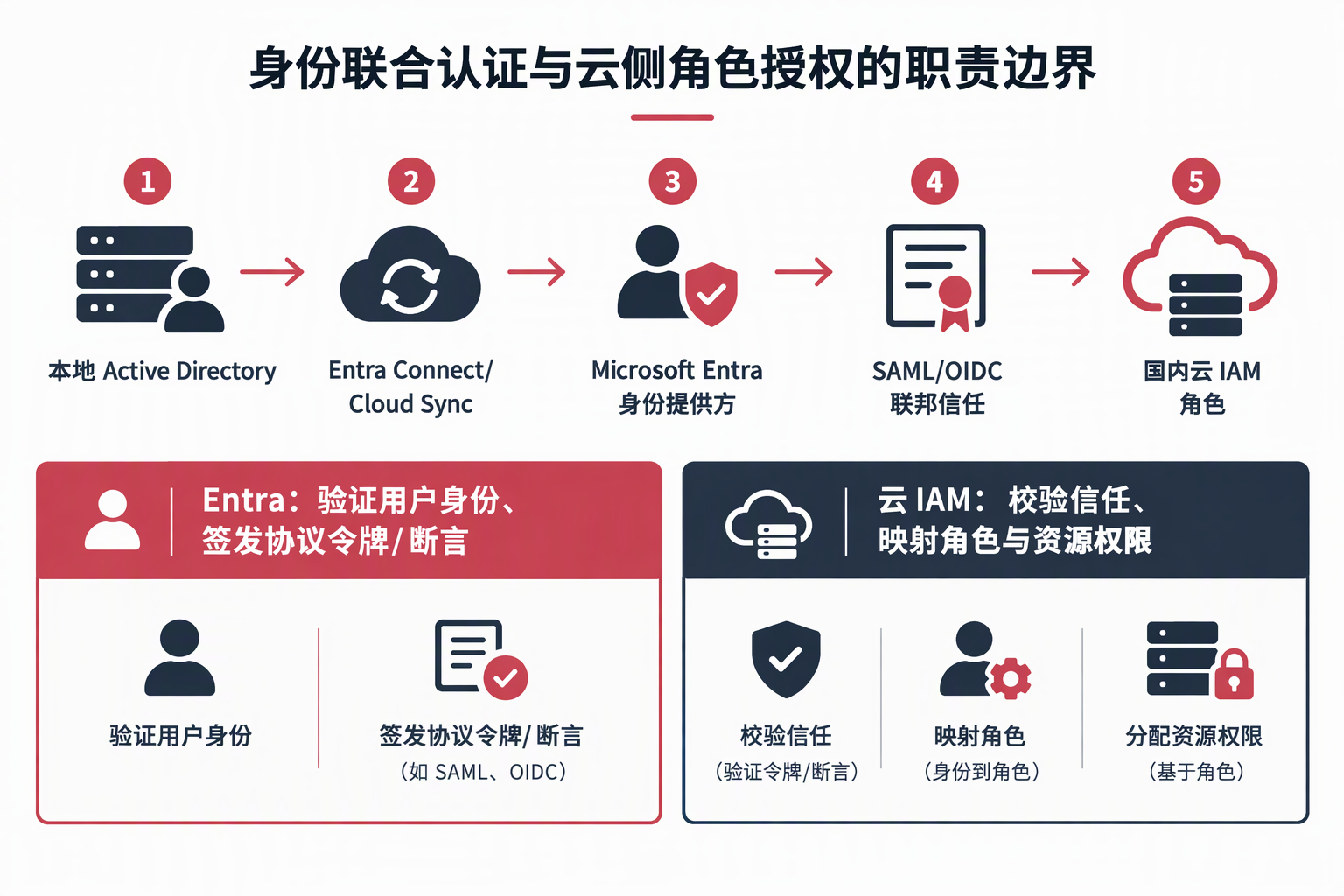
This is an architectural overview, not a single real-time transaction. Directory synchronization brings selected identity objects into the cloud directory; SAML/OIDC federation is a separate sign-in flow; cloud-side role mapping must also be configured independently. How quickly access is revoked after a token or session has been issued depends on each provider’s session and credential mechanisms.
3. Mainland China cloud providers: documented federation options
At the time of review, the following providers’ official documentation described enterprise-IdP federation or SSO options. Their feature names, protocol details, and role models differ. Documentation of a federation protocol should not be read as proof that every product, region, or account type supports it, or that a one-click Entra gallery integration is available.
| Cloud platform | Federation option documented by the provider | Implementation consideration |
|---|---|---|
| Alibaba Cloud | RAM documents role-based SSO using SAML 2.0, allowing a user from an enterprise IdP to assume a RAM role. | Configure the RAM identity provider, trust relationship, and role policy; use the assertion attributes required by the RAM documentation. |
| Tencent Cloud | CAM documents SAML 2.0 federation, IdP roles, and temporary access credentials. | Configure Entra as the SAML IdP. Role policies remain managed in CAM. |
| Huawei Cloud | IAM documents user SSO/federation based on SAML. | Confirm the applicable IAM version, account model, identity mapping, and assertion-signature requirements. |
| JD Cloud | IAM user SSO provides a workflow for configuring enterprise-IdP SAML metadata. | The provider notes that enabling SSO changes IAM sub-user console sign-in behavior; plan a rollback and retain an emergency administrator account. |
| Volcengine | IAM documents SAML 2.0 user and role SSO, as well as an OAuth 2.0 route for user SSO. | User and role SSO have different identity-mapping and IdP constraints; choose the flow that fits the use case. |
These examples show protocol-level federation, not complete native support for every Entra premium policy, automated account provisioning/deprovisioning, or group synchronization. If a provider requires a pre-existing IAM user, SSO may unify the authentication experience while the cloud user object and offboarding process still need separate governance. Role federation and temporary credentials can reduce reliance on long-lived accounts and keys where the provider supports them.
4. What Entra ID Free can do—and where it stops
Microsoft Entra ID Free is included with Microsoft cloud subscriptions such as Azure and Microsoft 365. Its capabilities include user and group management, basic directory synchronization, basic reports, cloud-user self-service password changes, and single sign-on to Azure, Microsoft 365, and many commonly used SaaS applications. See Microsoft’s Entra service description. Free also offers security defaults for baseline MFA protection, and some cloud-service user-provisioning capabilities are available without a premium license. Eligibility depends on the organization’s subscription and the licensing terms for the specific feature.
“Free” does not mean that every enterprise conditional-access or lifecycle-governance feature is included:
- Conditional Access is not included in Free. Free does not provide the same flexible, context-based policies using signals such as location, device, application, or risk. Conditional Access generally requires Entra ID P1. Security defaults offer a more uniform baseline; they are not customizable Conditional Access policies.
- Baseline MFA has less granular control. Security defaults can require MFA, but the available methods and administrative controls are not equivalent to P1/P2. Check that employee devices and authentication methods are suitable before deployment.
- Some advanced hybrid and self-service features require premium licensing. Examples include on-premises password-reset writeback, Application Proxy, dynamic groups, and group writeback, depending on the specific feature and suite. AD synchronization alone does not make every related function free.
- Identity-risk and privileged-access governance are premium capabilities. Risk-based Conditional Access, Identity Protection, and Privileged Identity Management generally require P2 or applicable advanced licensing.
- Directory quotas apply. Microsoft’s current limits documentation lists a default Free-tenant quota of 50,000 directory resources, generally increasing to 300,000 after a domain is verified. A temporary restriction also applies during the first two days of a new tenant. These are directory-resource limits, not a simple 50,000-employee seat cap: users, groups, applications, and other directory objects count. Quotas and terms can change.
- Free does not make every connected service free. Cloud resources, third-party applications, external-identity billing, and some premium capabilities may incur separate charges. Entra ID Free and Entra External ID have different billing models.
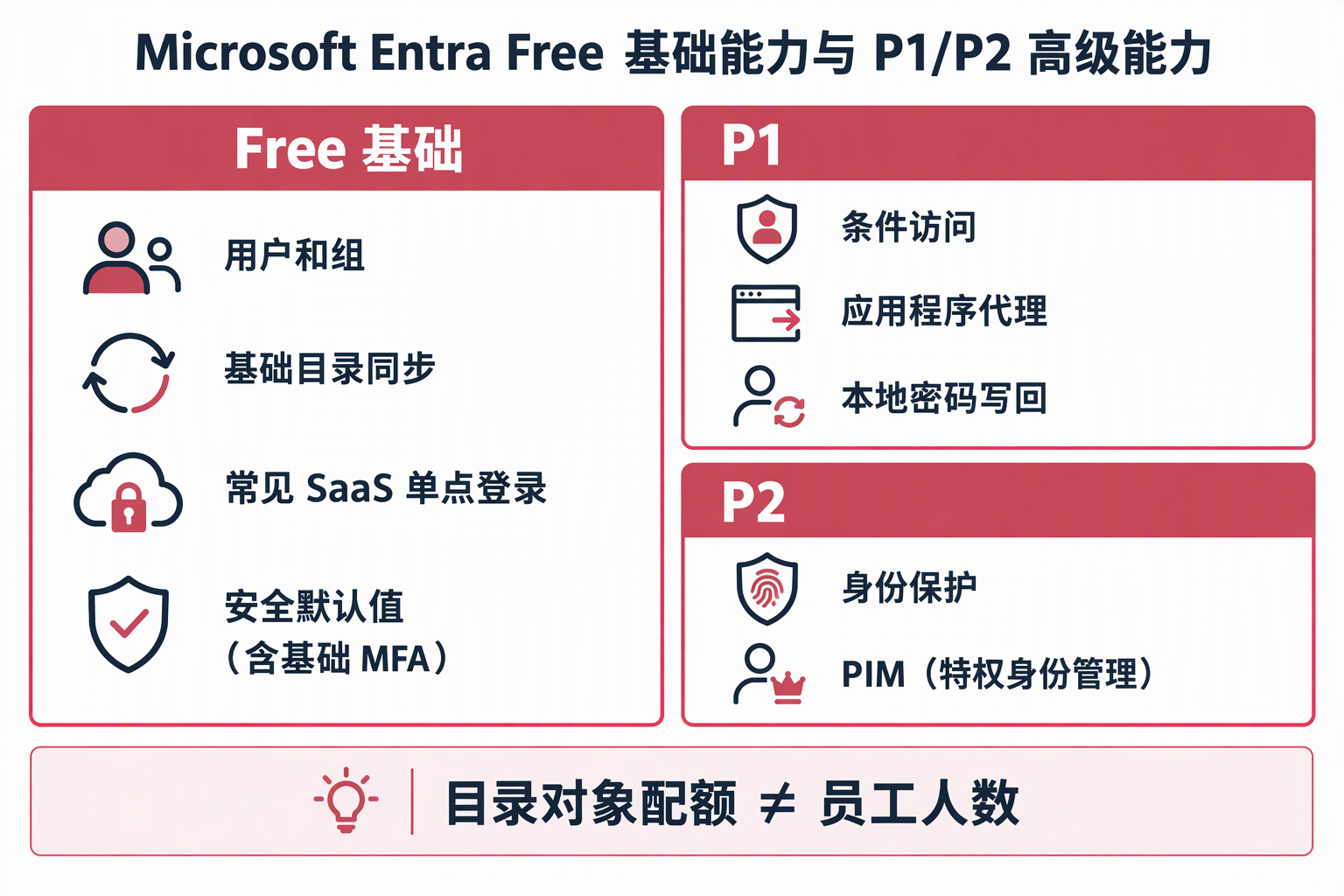
This illustration is a high-level capability overview, not a substitute for checking the licensing terms for a particular tenant and subscription. Security defaults provide baseline MFA; they are not the P1 Conditional Access feature.
Free can be a practical starting point for directory cleanup, basic synchronization, SaaS SSO, and a security-defaults pilot. If the organization needs context-based access policies, secure publication of on-premises applications, password writeback, automated identity governance, or risk response, first inventory whether existing Microsoft 365 subscriptions already include P1/P2 for the relevant users and workloads. Then assess any additional licensing rather than assuming that Free includes those capabilities or paying twice for an entitlement already held.
5. Design explicitly for Microsoft’s China cloud boundary
Azure operated by 21Vianet in China and global Azure are separate cloud instances with different portals and authentication endpoints. The Entra authentication endpoint for the China cloud is login.partner.microsoftonline.cn; the global-cloud endpoint is login.microsoftonline.com. Register applications and use the endpoints for the cloud instance in which the tenant resides. A global-cloud configuration cannot simply be copied into the 21Vianet environment.
Microsoft documents that global-cloud and 21Vianet tenants can establish B2B collaboration after the relevant Microsoft cloud settings and cross-tenant access policies are configured on both sides. This does not mean that every multitenant-organization, synchronization, or product feature works across clouds. Cloud Sync is available in the 21Vianet cloud, but on-premises identity SSPR writeback is not. For data residency, connectivity, external collaboration, licensing, and feature availability, verify each item against the current China-cloud service list and the tenant’s actual capabilities.
6. A practical implementation sequence
Start by inventorying the authoritative directory, identity lifecycle, and SaaS/cloud platforms in scope. Define a minimal attribute and group-naming standard, then pilot SAML role SSO with one department and one domestic cloud platform. Validate identity synchronization, offboarding, least-privilege roles, emergency administrator access, and auditability before expanding platform by platform. Prefer standard OIDC for new applications when supported; configure cloud consoles according to each provider’s SAML and role-federation requirements. Finally, decide whether premium Conditional Access, risk protection, or identity-governance features are needed.
A genuinely unified identity design does not put every permission into one directory. It makes the identity source clear, applies consistent sign-in controls, leaves resource authorization with the system that owns the resource, and ensures access is addressed when people’s roles change. DELine can help assess an organization’s on-premises AD and Entra hybrid path, plan SAML/OIDC federation with mainland China cloud providers, review least-privilege roles and emergency access, and validate licensing and China-cloud boundaries. Contact DELine to discuss an implementation approach that fits your existing architecture.
References
- Microsoft Entra licensing
- Microsoft Entra service description
- Microsoft Entra service limits and restrictions
- What is Microsoft Entra Cloud Sync?
- Microsoft Entra authentication and national clouds
- Microsoft Entra B2B in government and national clouds
- Alibaba Cloud: Overview of role-based SAML SSO
- Tencent Cloud: Accessing Tencent Cloud Console as SAML 2.0 Federated Users
- Huawei Cloud: Overview of IAM User SSO via SAML
- JD Cloud: Configure SAML on the SP side for user SSO
- Volcengine: Role SSO overview