
## Introduction
In today’s rapidly digitalizing environment, enterprise network security is paramount. The HTTP 403 error, often misunderstood as merely a permission issue when accessing web pages or APIs, can actually signal deeper security risks. This article delves into the causes of HTTP 403 errors, combining best practices in network security strategies and enterprise IT management to help effectively prevent and address potential threats, ensuring the security of corporate information assets.
> **Focus keywords:** HTTP 403 error, network security strategy, enterprise IT management, permission management, network security threats
## What is HTTP 403 Error and Its Security Implications
HTTP 403 error generally means “Forbidden,” indicating that the client’s request has been denied by the server due to insufficient permissions. While this error seems simple, repeated 403 errors in an enterprise environment may indicate:
– **Unauthorized access attempts:** Attackers or malware probing server permission vulnerabilities.
– **Misconfigured access policies:** Leading to legitimate users being wrongly denied, affecting business continuity.
– **Triggered application security policies:** For example, IP whitelist-based access control triggering unauthorized access alerts.
Enterprises detecting frequent 403 errors should be cautious of possible security loopholes or configuration mistakes. Following best practices from leading IT companies like Microsoft, it is recommended to analyze from these perspectives:
1. **Permission Management Audit:** Thoroughly review access permissions to avoid overexposure.
2. **Intelligent Log Analysis:** Use Security Information and Event Management (SIEM) systems to analyze abnormal access patterns.
3. **Multi-layered Protection:** Combine firewalls and authentication mechanisms to strengthen access control.
> For example, Microsoft’s Azure Role-Based Access Control (RBAC) enables precise permission assignment, effectively reducing HTTP 403 errors while preventing unauthorized access.
## Building an Effective Enterprise Network Security Strategy to Prevent HTTP 403 Errors
When encountering HTTP 403 errors, enterprises should not stop at surface-level troubleshooting but incorporate them as key elements in overall network security strategy. Key strategies include:
### 1. Fine-grained Permission Management
Adhere to the principle of least privilege, granting users and services only the minimal necessary permissions. Define clear access boundaries through roles and groups, reducing risks of privilege abuse. Utilize identity management tools such as Microsoft’s Active Directory for dynamic permission adjustment and real-time auditing.
### 2. Dynamic Access Control
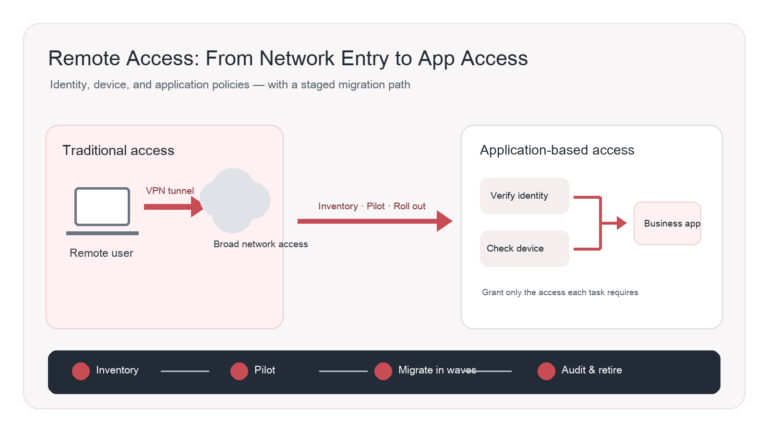
With cloud computing and remote work increasing, traditional static permission models no longer suffice. Implement risk-based dynamic access control that considers user identity, device state, geographic location, and behavioral patterns to intelligently grant or deny access. This approach significantly reduces false 403 denials.
### 3. Multi-factor Authentication and Zero Trust Architecture
Single-factor password authentication is insufficient. Implement multi-factor authentication (MFA) combined with biometrics and dynamic codes to prevent unauthorized access even if credentials are compromised. Zero trust principles—”never trust, always verify”—require continuous validation of every access request, including from inside the network, mitigating internal threats.
### 4. Log Monitoring and Security Incident Response
Utilize SIEM platforms linked with Azure Sentinel or similar products to monitor HTTP 403 error logs in real time. Investigate and block suspicious IP addresses with frequent errors. Develop comprehensive response plans covering notifications, risk mitigation, and business recovery to promptly address security issues.
### 5. Regular Security Training and Awareness Enhancement
Human error often causes misconfigured permissions or leaks. Continuously conduct network security training to educate employees about the correct understanding of 403 errors and permission policy rules, elevating overall security awareness and reducing human-factor risks.
## HTTP 403 Error Case Studies and Lessons
### Case 1: Frequent HTTP 403 Errors on Company API
A company launched a new API product and detected many 403 error logs. Initially misattributed to client permission issues; further analysis revealed third-party integrators’ IPs were not whitelisted, causing legitimate requests to be blocked. The incident highlighted incomplete permission management and risked customer service disruptions.
**Solution:** Improve IP whitelist management with automated update mechanisms to enhance access flexibility and security.
### Case 2: Employee Mistake Leading to Internal System Access Denial
An administrator accidentally deleted some group permissions, resulting in some employees losing access to critical business systems. The 403 error negatively affected operational efficiency. The company resolved the problem quickly using permission backup and restoration mechanisms.
**Lesson:** Permission changes must undergo review and dual approval to ensure safe operation.
## Frequently Asked Questions (FAQ)
**Q1: What’s the difference between HTTP 403 and 401 errors?**
A: 401 means “Unauthorized,” requiring authentication; 403 means “Forbidden,” indicating verified users lack access permissions.
**Q2: How to quickly troubleshoot HTTP 403 errors?**
A: Check user permission settings, access control lists (ACLs), firewall rules, and IP whitelists, combined with detailed server log analysis.
**Q3: How to prevent HTTP 403 errors from impacting business when using cloud services?**
A: Use cloud providers’ recommended identity and permission management tools, such as Azure RBAC, alongside dynamic access policies.
**Q4: Can multi-factor authentication completely prevent HTTP 403 errors?**
A: MFA improves authentication security, but 403 errors are often related to permission configuration; thus comprehensive management of permissions and access policies is needed.
**Q5: Why do sudden spikes of HTTP 403 errors occur?**
A: Possible causes include security attacks (e.g., brute force), configuration changes, or system upgrades. Logs should be examined accordingly.
**Q6: Do enterprises need regular permission audits to prevent 403 errors?**
A: Absolutely, periodic permission review identifies abnormal grants and prevents security vulnerabilities.
In today’s network environment, HTTP 403 errors are not just access denials but security warning signals. With effective network security strategies and industry-leading solutions like Microsoft’s, enterprises can transform 403 errors into opportunities to enhance safeguards and build a robust information security barrier.
Advancing your enterprise towards a safer digital future is the responsibility of every IT security leader. If you are interested in planning and implementing advanced access control and security solutions, please visit [De-Line Information Technology](https://www.de-line.net) to learn about our professional enterprise network security services. Your network security, we protect with dedication! 🔐✨
************
The above content is provided by our AI automation poster